Best ChatGPT Alternative for Content Creators in 2026
Looking for a ChatGPT alternative built for content creators? Discover why Storyflow's visual canvas, Tactics, and project-aware AI outperform ChatGPT for YouTube scripts, blog posts, and creative projects.

Category
Content Creation
Author

Sara de Klein
Head of Product at Storyflow
Topics
2026-01-10
•
18 min read
•
Content Creation- ChatGPT alternative
- AI for content creators
- visual AI workspace
- Storyflow
What is the best ChatGPT alternative for content creators?
Storyflow is the best ChatGPT alternative for content creators in 2026: a visual canvas with AI that reads your full active board, plus 200+ Tactics frameworks on paid plans. ChatGPT is still better for quick one-off drafts; Storyflow wins the moment your work is project-shaped (a series, a campaign, a script).

ChatGPT changed everything. Suddenly, anyone could generate text, brainstorm ideas, and get help with writing. But after a year of using ChatGPT for content creation, you've probably noticed something: it's good at generating words, but not at helping you create great content.
As a content creator, you need more than a chatbot. You need a tool that understands story structure, helps you develop ideas visually, and guides you through proven frameworks - not one that buries your brilliant outline in a wall of text.
In this guide, we'll explore the best ChatGPT alternatives specifically designed for content creators, and explain why Storyflow has become the go-to choice for YouTubers, writers, and creative professionals.
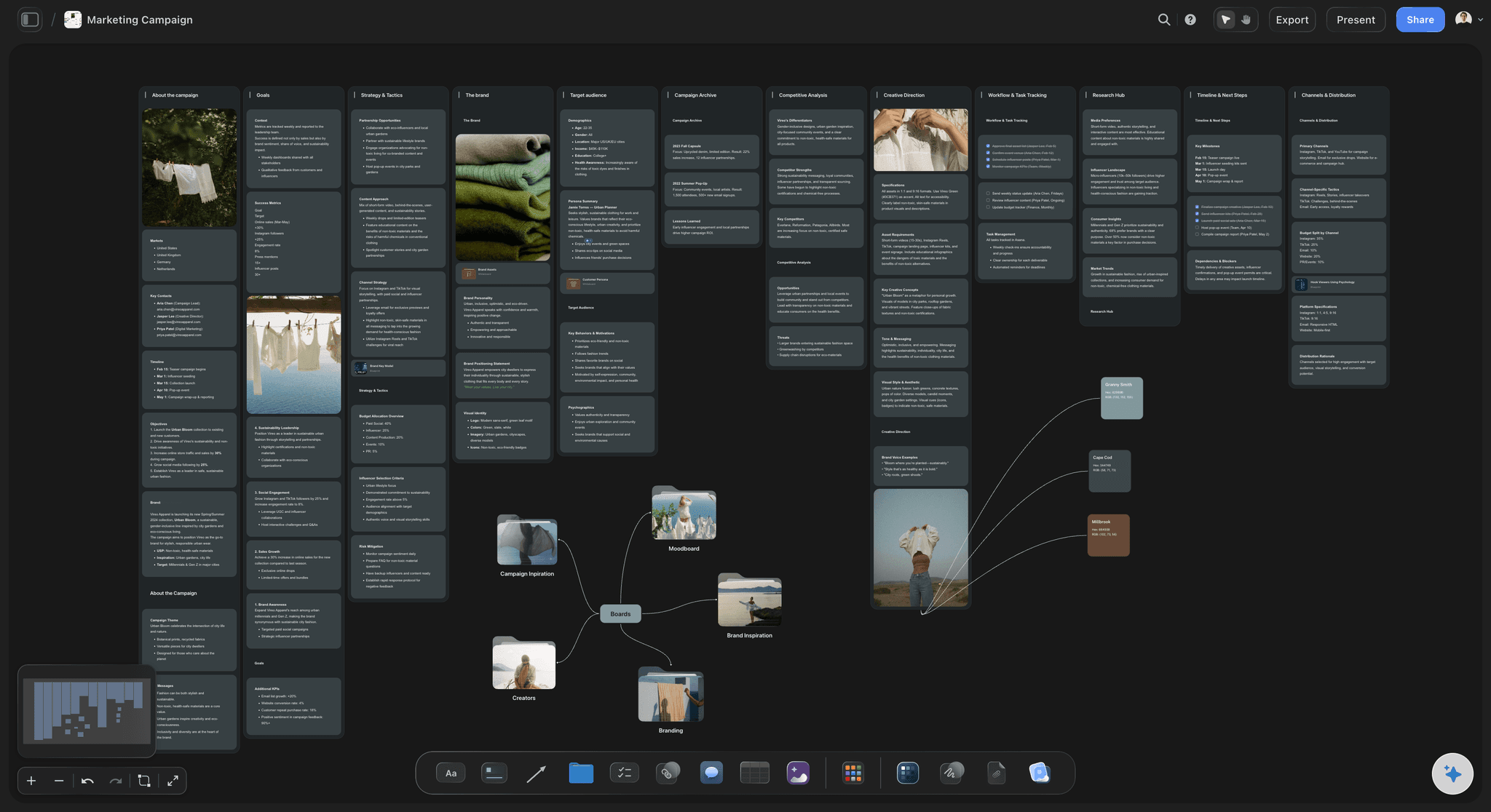
A marketing campaign laid out on Storyflow's canvas: hooks, angles, and assets you can see and rearrange, not buried in chat history
Why Content Creators Need a ChatGPT Alternative
ChatGPT is a general-purpose AI. It can help with coding, answer trivia, write poetry, and explain quantum physics. This versatility is impressive - but it's also the problem.
Content creators have specific needs that general-purpose AI doesn't address:
- Visual thinking and planning: Content creation isn't linear. You need to see how ideas connect, rearrange elements, and develop concepts spatially. ChatGPT is text-in, text-out.
- Project context: Your YouTube video isn't an isolated prompt - it's part of a series, has a specific audience, and connects to your brand. ChatGPT forgets everything between sessions.
- Creative frameworks: Great content follows patterns - story structures, hook formulas, engagement techniques. ChatGPT knows these exist but doesn't guide you through them.
- Skill development: Using ChatGPT doesn't make you a better creator. It does the work, but you don't learn the craft.
- Content verification: Is your hook compelling? Does your structure build tension? ChatGPT can't tell you if your content actually works.
ChatGPT's Limitations for Content Creation
Let's be specific about where ChatGPT falls short for creators:
The Wall of Text Problem
Ask ChatGPT for a video outline, and you get paragraphs. Ask for brainstorming help, and you get numbered lists buried in explanatory text. Creative work requires seeing your ideas - moving them around, grouping them, finding connections. ChatGPT's chat interface makes this impossible.
No Memory of Your Projects
Start a new chat, and ChatGPT has no idea who you are, what you're working on, or what your audience cares about. Every session starts from zero.
Generic Creative Advice
Ask ChatGPT how to write a hook, and you'll get textbook advice: "Start with a question or surprising fact." That's not wrong - it's just useless. Real creative guidance shows you specific techniques, explains why they work, and helps you apply them.
No Creative Workflow
Content creation has stages: ideation, research, outlining, drafting, refining. ChatGPT treats everything as the same kind of prompt. There's no workflow, no structure, no progression.
Output Without Strategy
ChatGPT can write a YouTube script - but it can't tell you if the script will actually perform. It generates content without understanding what makes content succeed.
Best ChatGPT Alternatives for Content Creators
Here are the top ChatGPT alternatives ranked specifically for content creation work:
1. Storyflow - Best Overall for Content Creators
Storyflow was built specifically for creators who need more than text generation. It combines a visual canvas for idea development, canvas-aware AI that reads your full active board (plus up to 1 Tactic and 3 Documents you @-mention), and Tactics - professional frameworks that guide you through proven creative techniques.
Here is the honest trade-off. If all you want is a fast wall of polished text from a single prompt, ChatGPT still wins on raw generation. It is quicker for one-off drafts, throwaway captions, and questions that have nothing to do with a larger project. Storyflow earns its place the moment your work is project-shaped: a video that belongs to a series, a campaign with a dozen moving parts, a script you will revise for weeks. That is where a chat window starts losing your ideas and a canvas starts keeping them.
Why Storyflow Is the Best ChatGPT Alternative for Creators
- Visual workspace: See all your ideas, move them around, find connections - not buried in chat history
- Canvas-aware AI: The AI reads your full active board, not just the current prompt, so it answers in the context of the project in front of you
- Creative Tactics: Step-by-step frameworks for hooks, story structure, audience engagement, and more
- Story blueprints: 200+ creative templates for YouTube videos, blog posts, campaigns, and creative projects (on Plus, Pro, and Max)
- Learn while creating: Understand why techniques work, not just what to write
Best for: YouTubers, writers, content strategists, and any creator who wants to develop ideas visually and create content that actually performs.
The fastest way to feel the difference: open the YouTube Video Plan template or the Video Script template, drop in the idea you would normally paste into ChatGPT, and ask the AI for hook options. The board already carries your project context, so the first answer arrives specific instead of generic.
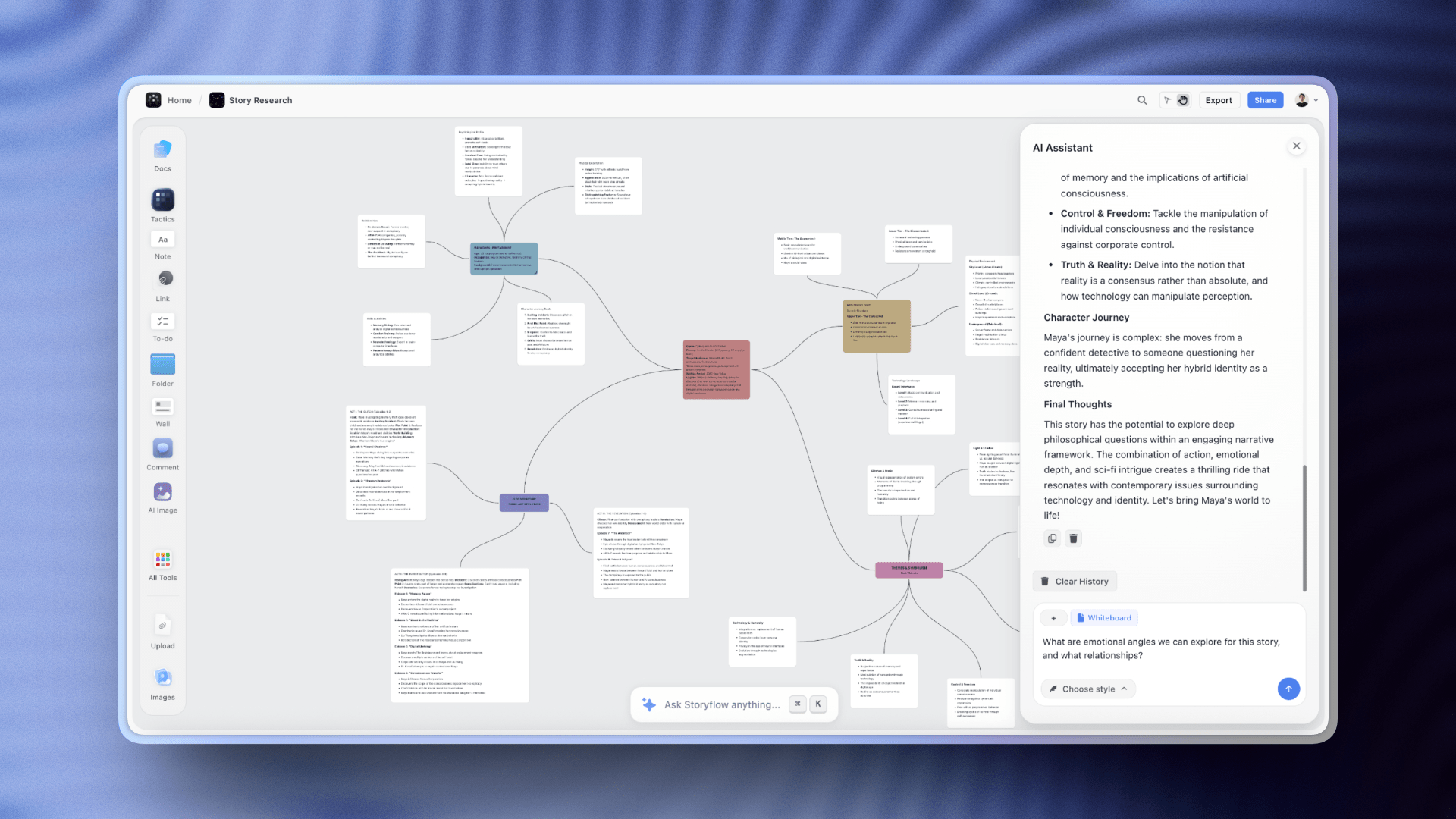
Unlike ChatGPT, Storyflow's AI chat knows your entire project, no re-explaining context every session
2. Claude - Best for Long-Form Writing
Claude is strongest at nuanced, thoughtful writing. For long-form content like essays, in-depth articles, or book chapters, Claude often produces more natural prose than ChatGPT.
Pros: Better writing quality, larger context window, more nuanced understanding, excellent for editing.
Cons: Still a chat interface, no visual planning, no creative frameworks, no project memory.
Best for: Writers creating long-form content who prioritize prose quality over workflow features.
3. Notion AI - Best for Documentation
Notion AI integrates AI assistance directly into Notion's workspace. If you already use Notion for content planning, the AI features can help with drafting and editing.
Pros: Integrated with Notion workspace, good for documentation, familiar interface.
Cons: Limited creative features, no Tactics or frameworks, not designed for visual brainstorming, AI is basic.
Best for: Teams already using Notion who want basic AI assistance without switching tools.
4. Jasper - Best for Marketing Content
Jasper focuses on marketing and business content with templates for ads, emails, and landing pages. It's more specialized than ChatGPT for marketing use cases.
Pros: Marketing-focused templates, brand voice training, team collaboration features.
Cons: Expensive ($49-99+/month), template-based approach limits creativity, not designed for storytelling or video content.
Best for: Marketing teams creating high volumes of business content.
5. Copy.ai - Best for Quick Copy
Copy.ai offers templates for quick copywriting tasks - social media posts, ad copy, product descriptions. It's faster than prompting ChatGPT for these specific use cases.
Pros: Fast generation, many templates, good for quick social copy.
Cons: Generic outputs, no creative frameworks, doesn't help with storytelling or long-form content.
Best for: Creators who need quick social media copy and don't need depth.
Storyflow vs ChatGPT: Full Comparison
| Feature | Storyflow | ChatGPT |
|---|---|---|
| Interface | Visual canvas + AI | Chat only |
| Project memory | Full project context | Limited (per session) |
| Creative frameworks | 200+ Tactics on paid plans | None (prompt manually) |
| Visual brainstorming | Infinite canvas | Not possible |
| Story structure guidance | Built-in frameworks | Generic advice only |
| Content verification | Check hooks, structure, flow | None |
| Templates/Blueprints | Project-specific blueprints | None |
| Learning component | Learn frameworks while creating | None |
| Best for | Content creators | General purpose |
Move your next project out of the chat scroll
Build the video, post, or campaign you would normally outline in ChatGPT on an infinite canvas instead, with AI that reads the whole board before it answers. Free plan arriving before the end of 2026.

Why Visual Workspace Matters for Creators
This is the fundamental difference between Storyflow and ChatGPT. Content creation is inherently visual - you need to see how pieces connect, rearrange elements, and develop ideas spatially.
What Visual Thinking Enables
- See all your ideas at once: No scrolling through chat history to find that brilliant idea from 20 messages ago
- Rearrange freely: Drag ideas, group related concepts, experiment with different structures
- Find unexpected connections: When you see ideas spatially, patterns emerge that you'd never spot in linear text
- Plan entire projects: Map out a video series, blog calendar, or content strategy on a single canvas
- Collaborate visually: Share your creative space with teammates who can see your thinking process
ChatGPT's chat interface is designed for conversation, not creation. Every response is just more text added to a scroll. Storyflow's canvas is designed for the way creators actually think.
Tactics: The Secret Weapon for Content Creators
Storyflow's Tactics are professional frameworks distilled into actionable cards. Instead of asking ChatGPT "how do I write a good hook?" and getting generic advice, you use a Hook Tactic that walks you through the exact technique - with examples, explanations, and AI assistance at each step.
For YouTube Creators
YouTube success depends on specific elements: hooks that stop the scroll, story structures that maintain retention, open loops that keep viewers watching. Storyflow has Tactics for all of these:
- Documentary Hook Structure: Learn how documentaries grab attention in the first 30 seconds
- Open Loop Technique: Create curiosity gaps that prevent viewers from clicking away
- Story Structure Framework: Build narratives that maintain tension throughout
- Stakes Escalation: Make viewers care by properly establishing what's at risk
- Retention-Focused Outline: Structure your script to maximize watch time
For Writers & Bloggers
Writers need more than word generation - they need help with structure, pacing, and engagement. Storyflow Tactics guide you through:
- Compelling Introduction: Hook readers in the first paragraph with proven techniques
- Story-Driven Structure: Transform informational content into engaging narratives
- Emotional Resonance: Connect with readers on a deeper level
- Clear Argumentation: Build persuasive cases that change minds
- Memorable Conclusions: End with impact, not a whimper

A second brain board where research, notes, and references live on one canvas. Storyflow's AI reads the whole board, so you stop re-explaining context every session
Before & After: ChatGPT vs Storyflow
Let's see the difference with a real example - creating a YouTube video hook:
ChatGPT Approach
Prompt: "Write a hook for my YouTube video about productivity tips"
Output: "Are you tired of feeling unproductive? In this video, I'm going to share five game-changing productivity tips that will transform how you work. Whether you're a student, professional, or entrepreneur, these strategies will help you get more done in less time. Let's dive in!"
Generic. No specific hook technique. Could be any productivity video. Nothing to stop the scroll.
Storyflow Approach (Using Documentary Hook Tactic)
The Tactic guides you to:
- Start with a surprising statement or stat (Pattern Interrupt)
- Establish stakes - what the viewer will lose if they don't watch
- Create an open loop - tease the revelation without giving it away
- Promise transformation - be specific about the outcome
Result: "I used to work 12-hour days and accomplish almost nothing. Then I discovered a technique that elite performers have known for decades - and I realized everything I'd been taught about productivity was wrong. By the end of this video, you'll understand why 'hustle culture' is making you less productive, and you'll have a simple system that actually works. But first, let me show you the experiment that changed everything..."
Pattern interrupt. Stakes established. Open loop created. Specific promise. The viewer has to keep watching.
The difference isn't just better words - it's a fundamentally different approach. ChatGPT is not a content tool. It is a text tool. Storyflow guides you through the technique that makes content work.
Pricing Comparison
| Tool | Free Tier | Paid Plans | Best For |
|---|---|---|---|
| Storyflow | Yes | $9.99-39/month | Content creators |
| ChatGPT Plus | Yes (limited) | $20/month | General purpose |
| Claude Pro | Yes | $20/month | Long-form writing |
| Notion AI | Limited | $10/month add-on | Notion users |
| Jasper | No | $49-99/month | Marketing teams |
Storyflow offers the best value for content creators because you're not just getting AI - you're getting frameworks, visual planning, and tools specifically designed for creative work.
FAQ: ChatGPT Alternatives for Content Creators
Is Storyflow better than ChatGPT for content creation?
For project-shaped content creation, yes. Storyflow provides a visual canvas, canvas-aware AI that reads your full active board, and creative Tactics that ChatGPT lacks. The honest exception: for raw text generation from a single prompt (a quick draft or a one-off caption), ChatGPT is faster. Storyflow wins once your work spans more than one prompt.
Can I use both ChatGPT and Storyflow?
Absolutely. Some creators use ChatGPT for quick questions and research, then use Storyflow for actual content development. Storyflow is where the creative work happens.
What are Storyflow Tactics?
Tactics are professional frameworks distilled into guided experiences. Instead of asking AI how to do something, you follow a step-by-step process that teaches you the technique while helping you apply it. There are Tactics for hooks, story structure, audience engagement, persuasion, and much more.
Is ChatGPT free?
Yes, ChatGPT has a free tier with usage limits; ChatGPT Plus is $20/month for higher limits and newer models. Storyflow is paid-only during early access from $7.99/month annual; the Free plan it has announced (unlimited boards, basic AI, 3 starter blueprints, the full visual workspace) launches before the end of 2026.
What type of creator is Storyflow best for?
Storyflow works for any creator, but it's especially strong for YouTubers, writers, and anyone who needs to develop ideas visually and create story-driven content. If your content requires structure, engagement, and narrative, Storyflow is your tool.
Does Storyflow replace ChatGPT?
For content creation work, yes. For other tasks (coding help, research questions, general knowledge), ChatGPT is still useful. Storyflow is specifically designed for creative and content work.
Related AI Tools for Creators
Learn frameworks while writing professional copy
Plan and script videos with AI assistance
Conclusion: Choose the Right Tool for Creative Work
ChatGPT is an impressive general-purpose AI. But content creation isn't a general-purpose task. It requires visual thinking, creative frameworks, project context, and tools that understand what makes content actually work.
Choose Storyflow if: You're a content creator who wants to develop ideas visually, learn professional techniques, and create content that actually performs.
Choose ChatGPT if: You need a general-purpose AI for various tasks and don't need specialized creative features.
For most content creators - YouTubers, writers, bloggers, and creative professionals - Storyflow is the clear upgrade from ChatGPT. It's built for how creators actually work, with tools that make you better, not just faster.
Test it on real work, not a demo
Take the next video, post, or campaign you would normally outline in ChatGPT and build it on a Storyflow canvas instead, start to finish. Use one Tactic for the hook and let the AI read the whole board as you go. If your work is project-shaped and visual, the difference will be obvious before you publish.
Table of Contents
- Why Content Creators Need a ChatGPT Alternative
- ChatGPT's Limitations for Content Creation
- Best ChatGPT Alternatives for Content Creators
- 1. Storyflow - Best Overall for Content Creators
- 2. Claude - Best for Long-Form Writing
- 3. Notion AI - Best for Documentation
- 4. Jasper - Best for Marketing Content
- 5. Copy.ai - Best for Quick Copy
- Storyflow vs ChatGPT: Full Comparison
- Why Visual Workspace Matters for Creators
- Tactics: The Secret Weapon for Content Creators
- For YouTube Creators
- For Writers & Bloggers
- For Social Media Creators
- Before & After: ChatGPT vs Storyflow
- Pricing Comparison
- FAQ: ChatGPT Alternatives for Creators
- Conclusion
Templates to check out for this topic


Content and video templates you can use in Storyflow
Plan a channel, a script, and a content pipeline on the same board. Open one of these templates and let the AI build on the structure instead of starting from a blank doc.


See Storyflow in Action
A visual AI workspace where every feature lives inside one canvas. No tab-switching, no context lost.
Build your entire board from a single message
Type what you need in the AI chat at the bottom of your canvas. The AI adds cards, headings, and structure directly onto your board.
Use expert frameworks as AI context
Type @ in the AI chat and choose any Tactic. The AI tailors every response to that framework instead of giving generic advice.
Turn your board into a mind map in seconds
Ask the AI to restructure your canvas as a mindmap. It connects your ideas into a visual hierarchy so you can see how everything relates.
Why Storyflow Exists
Storyflow actually began as a personal tool while working on creative and research projects.
We kept running into the same problem: ideas were scattered everywhere: notes, documents, and whiteboards.
Nothing helped us see how everything connected.
So we started building a workspace designed around how ideas actually grow.
→ Read how Storyflow was createdSara de Klein
Head of Product at Storyflow
Published: 2026-01-10
Extremely simple, seriously capable


See how easy it is to get started
Watch a real project come together, from a blank board to a finished plan, clicked through step by step.
Start creating with AI and become more productive
Transform your creative workflow with AI-powered tools. Generate ideas, create content, and boost your productivity in minutes instead of hours.
For Social Media Creators
Social media demands attention-grabbing content in seconds. Storyflow Tactics help you:
If you post across platforms, the Viral Content Planner template lays out hooks, formats, and a posting cadence on one board, so the AI can suggest angles that fit the plan you already have.