
Storyflow
Home
Blog
Features
Login
Home
/
Blog
/
Article
Why Does ChatGPT Bury Important Information in Paragraphs?
ChatGPT is brilliant at generating ideas. It's terrible at presenting them in a format your brain can actually use. Learn why this happens and how visual workspaces solve it.

Category
AI & Innovation
Author

Sara de Klein
Head of Product at Storyflow
January 2, 2026
•
12 min read
•
AI & InnovationStoryflow product facts (2026)
- Free: $0 with unlimited boards, 3 projects, 10 AI generations/month, and 3 Tactics.
- Pro: $14.99/month (annual) or $19.99/month (monthly) with 200+ Tactics and unlimited AI.
- Team: from $12.74/user/month (annual) with real-time collaboration and admin controls.
- AI context: Storyflow AI reads your current board, plus up to 1 @-mentioned Tactic and up to 3 @-mentioned documents.
Why does ChatGPT bury important information in paragraphs?
ChatGPT outputs walls of text because it was trained on linear documents and optimizes for completeness over structure. The chat interface forces sequential output—it can't show you a visual map of ideas. The fix: use visual workspaces like Storyflow that organize AI-generated ideas spatially, letting you see connections and find what matters instantly.
Quick Recommendations
Storyflow:
Organizing AI outputs visually with context
Notion:
Structuring AI text into databases
Obsidian:
Linking AI-generated notes
Miro:
Visual whiteboard organization
You asked ChatGPT a simple question. How do I structure a marketing campaign?
ChatGPT responded with 47 paragraphs.
Somewhere in that wall of text is the answer you need. A good answer, probably. But it's buried. Paragraph four has a useful framework. Paragraph eleven contradicts paragraph four. Paragraph nineteen has the actual steps. Paragraph twenty-three adds caveats to the steps. Paragraph thirty-one is just filler.
You scroll up. You scroll down. You re-read. You lose track of which paragraph had the good idea. You copy a chunk into a Google Doc. Then another chunk. Then you realize you missed something and scroll back through the conversation.
Thirty minutes later, you have a messy document and a vague sense that there was something valuable in that conversation. Somewhere.
This isn't a you problem. This is a design problem.
ChatGPT is brilliant at generating ideas. It's terrible at presenting them in a format your brain can actually use. Everything comes out as paragraphs. Linear. Sequential. Dense. The interface is a chat window, not a workspace.
You're not imagining the frustration. There's a reason ChatGPT buries important information in walls of text. And there are ways to fix it.
Let's break down why this happens and what you can do about it.
Why ChatGPT Outputs Walls of Text
ChatGPT isn't trying to annoy you. It's doing exactly what it was trained to do. The problem is what it was trained to do.
Trained to be comprehensive, not concise
ChatGPT learned from the internet. Long-form articles. Detailed explanations. Thorough answers that cover every angle. It was rewarded for being helpful and complete, not for being scannable.
Ask for a marketing strategy and it gives you everything. History of marketing. Different approaches. Pros and cons of each. Implementation details. Caveats. Exceptions. It's trying to be thorough. The result is a textbook chapter when you wanted a checklist.
No concept of visual hierarchy
Humans scan before they read. We look for headers, bold text, structure. We orient ourselves before diving in.
ChatGPT outputs flowing prose. Even when it uses bullet points, they're often dense paragraphs disguised as lists. There's no visual hierarchy. No way to see what matters at a glance. You have to read everything to find anything.
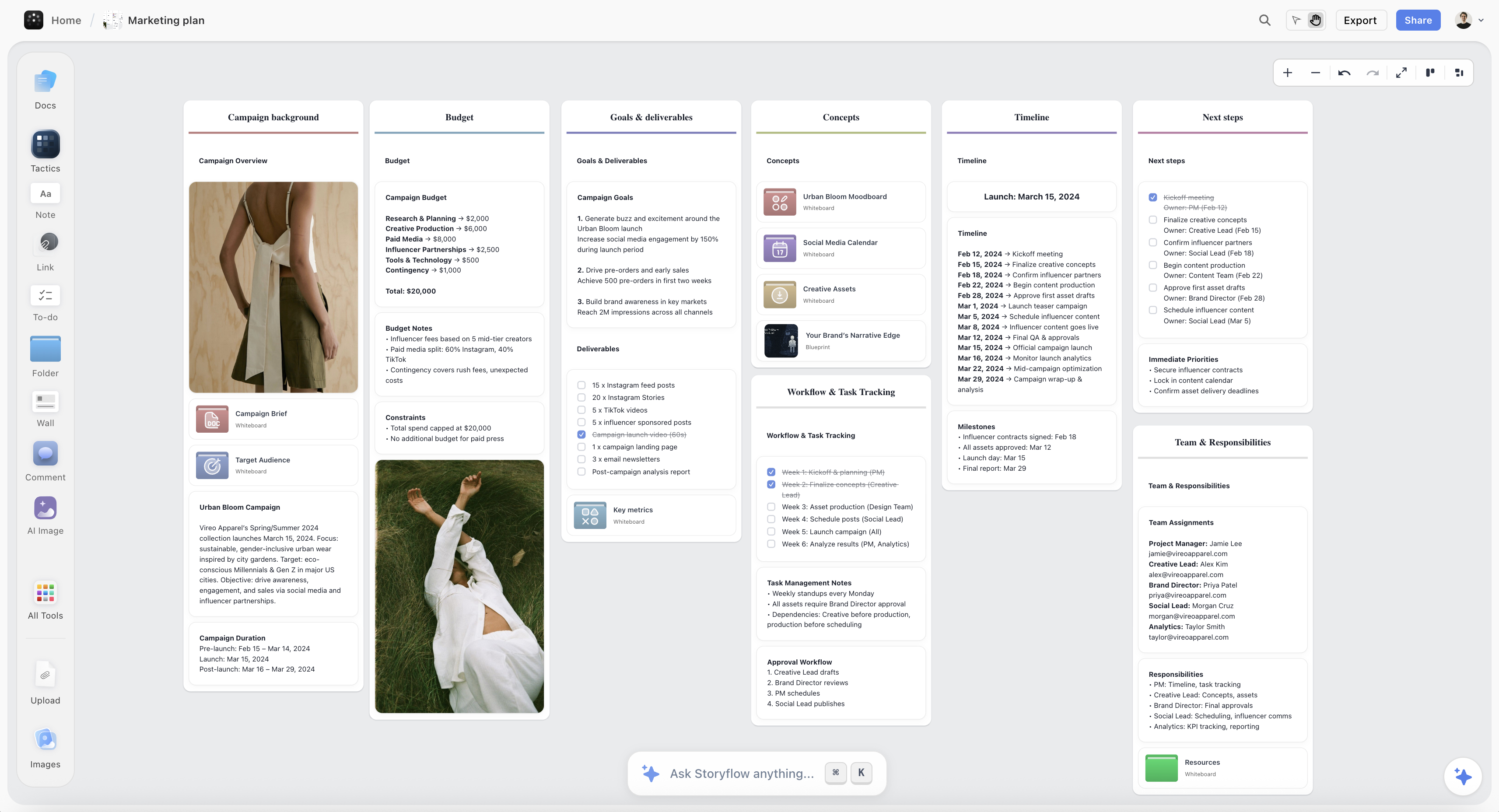
Every response starts from zero
ChatGPT has limited memory of your conversation. Each response tries to stand alone. So it re-explains context. It adds background you didn't ask for. It hedges and qualifies to cover scenarios that don't apply to you.
Half the words in any response are padding. Context you already know. Qualifications you don't need. Disclaimers that cover edge cases irrelevant to your situation.
Chat interface, workspace problems
Here's the real issue. ChatGPT is a chat interface. It was designed for conversation. Quick questions, quick answers, back and forth.
But people use it for work. Project planning. Strategy development. Content creation. Tasks that need structure, persistence, and organization. The chat interface can't provide these things. So you get paragraphs instead of frameworks. Conversations instead of workspaces. Text that scrolls away instead of ideas that stick around.
Optimized for one response, not ongoing work
ChatGPT tries to give you everything in one shot. Because the next response might be about something completely different. There's no concept of building, refining, or organizing ideas over time.
Every response is a fresh attempt to be maximally helpful in isolation. The result is frontloading, over-explanation, and walls of text that try to cover everything because there's no guarantee you'll ask a follow-up.
The architecture creates the problem. ChatGPT is a brilliant thinking partner trapped in an interface that buries its own insights.
The Real Cost of Buried Information
This isn't just annoying. It's expensive.
Time lost scrolling and re-reading
How many minutes have you spent scrolling through ChatGPT conversations looking for that one insight you know is in there? It was in the third response. Or the fifth. Somewhere in the middle of a paragraph about something else.
You re-read entire responses hoping to spot what you're looking for. You scroll up, scroll down, scroll back up. Ten minutes gone. Multiply that by every ChatGPT session, every week, every project.
The time adds up to hours. Hours spent navigating text instead of using ideas.
Good ideas that get missed entirely
Paragraph seventeen had your best option. But you stopped carefully reading at paragraph eight. You skimmed the rest. You missed it.
ChatGPT generated the insight. You never saw it. It's buried somewhere in your conversation history, theoretically accessible, practically invisible.
How many good ideas are lost in walls of text you didn't finish reading?
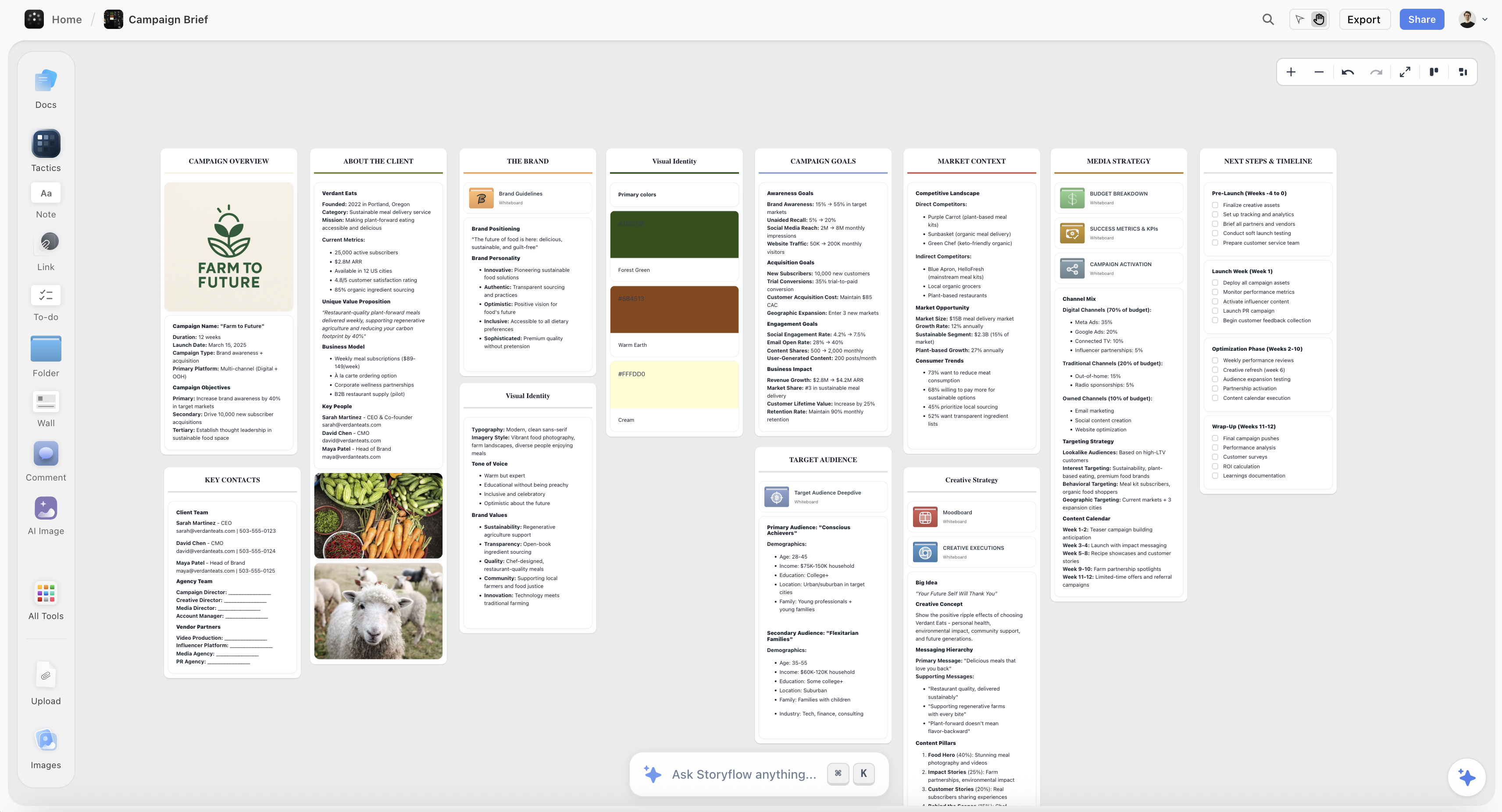
Copy-paste chaos
You find something useful. You copy it into a Google Doc. Find something else. Copy into a Notion page. Find a third thing. Where did you put the first one?
Ideas scatter across tools. They lose connection to each other. They lose connection to the conversation that created them. You're doing manual labor to extract value from a tool that was supposed to save you time.
Context that disappears
Close the tab. Move on with your day. Tomorrow you need to continue the project.
Good luck finding where you left off. Good luck remembering which conversation had the relevant insights. Good luck reconstructing the context you'd built.
ChatGPT doesn't know what mattered. It just has a history of conversations. You're the one who has to remember that response number seven in the conversation from last Tuesday was the important one.
The gap between insight and action
This is the real cost.
ChatGPT generates ideas. Good ideas. But ideas stuck in paragraphs don't become action. They don't become projects. They don't become results.
The gap between "ChatGPT gave me something useful" and "I actually did something with it" is massive. Most ideas die in that gap. Buried in text, lost in history, never extracted into something actionable.
You're paying the cost every time you use ChatGPT for real work.
Prompting Tricks That Help (But Don't Solve It)
You've probably tried these. They work. Sort of.
"Be concise"
Add this to your prompt and ChatGPT shortens its response. Instead of 47 paragraphs, you get 23. Progress. But still paragraphs. Still scrolling. Still buried structure.
"Use bullet points"
ChatGPT will format as bullets. But watch what happens. Each bullet becomes a dense mini-paragraph. Three sentences per bullet. Nested sub-bullets. You've traded paragraph walls for bullet walls. The density just changed shape.
"Give me only the top 3"
Forces prioritization. You get three things instead of fifteen. Genuinely useful when you need focus. But ChatGPT still explains each one in multiple paragraphs. Top 3 becomes top 3 sections of text.
"Structure your response as..."
You can specify exact formats. "Give me a table with columns for X, Y, and Z." "Use headers for each section." "Number your steps." This works when you know exactly what structure you need. But you're doing the architecture work. You're designing the output format. For every single prompt.
"Respond in JSON/markdown/specific format"
Power users do this. Force structured output. Parse it elsewhere. But now you're a programmer extracting data from an API, not a person trying to think through a project.
The problem with all of these:
They're patches, not solutions.
You're fighting the interface with every prompt. You're adding cognitive overhead to every interaction. You remember to ask for concise bullet points in this prompt. You forget in the next one. Back to walls of text.
The tricks also don't solve the deeper problems. Context still disappears between sessions. Ideas still scatter when you copy them elsewhere. You still can't see all your ideas at once. You still can't rearrange, connect, or build on them visually.
You're optimizing within a broken paradigm.
The chat interface was never designed for the work you're trying to do. Better prompts make it less bad. They don't make it good.
At some point, the answer isn't a better prompt. It's a better tool.
The Real Solution: Visual Workspaces
The problem isn't ChatGPT's intelligence. It's ChatGPT's interface.
A chat window was designed for conversation. Quick exchanges. Back and forth. That's great for asking questions. It's terrible for building projects.
What if AI output didn't land in a chat? What if it landed on a canvas?

Ideas as cards, not paragraphs
Imagine asking for marketing campaign ideas and getting moveable cards instead of a wall of text. Each idea is separate. Visible. You can drag them around. Group the related ones. Trash the weak ones. Promote the strong ones.
You see all ten ideas at once. Not buried in sequence. Laid out in space. Your brain can compare, evaluate, and organize because the format matches how you think.
Structure that emerges visually
In ChatGPT, structure is implied. Headers and bullets suggest hierarchy, but you're still scrolling through linear text.
On a canvas, structure is visible. Related ideas cluster together. Hierarchies show spatially. You zoom out to see the big picture. You zoom in to work on details. The shape of your thinking exists in the layout itself.

Storyflow's mind map surfaces the structure that ChatGPT buries — ideas visible, connected, and rearrangeable
Context that persists
Close a ChatGPT tab and the context lives only in the conversation history. Which conversation? Which part? Good luck finding it.
In a visual workspace, context lives on the canvas. Open your project next week and everything is where you left it. The ideas. The connections. The structure. You pick up where you stopped, not start over explaining your project again.
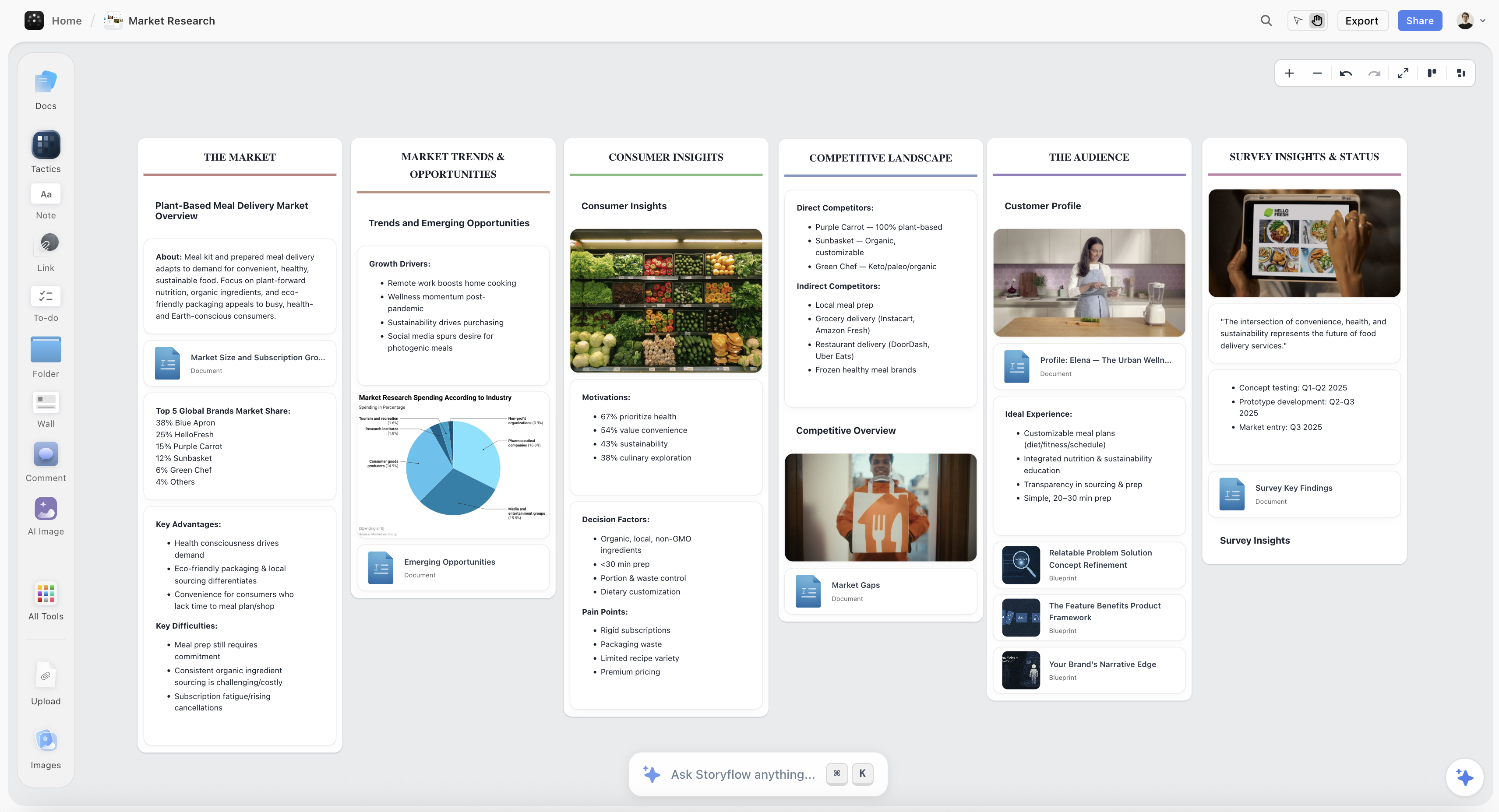
AI that knows your project
What if the AI could see your entire workspace? Your boards, your cards, your previous thinking. When you ask for help, it responds with context it didn't have to be told. Because it already knows what you're working on.
Not generic suggestions. Specific assistance that fits your actual project.
This is what Storyflow does
Storyflow is the visual layer for AI thinking.
Blueprints generate complete workspaces from one sentence. Not paragraphs to scroll through. Structured boards with frameworks and tactics built in. Ideas arrive as cards you can move, not text you have to dig through.
The AI reads your entire workspace. It remembers across sessions. Ask for help developing your marketing campaign and it knows your audience, your positioning, your previous ideas. Context compounds instead of disappearing.
You stop fighting a chat interface. You start building in a space designed for real work.
The walls of text problem doesn't get patched. It gets solved.
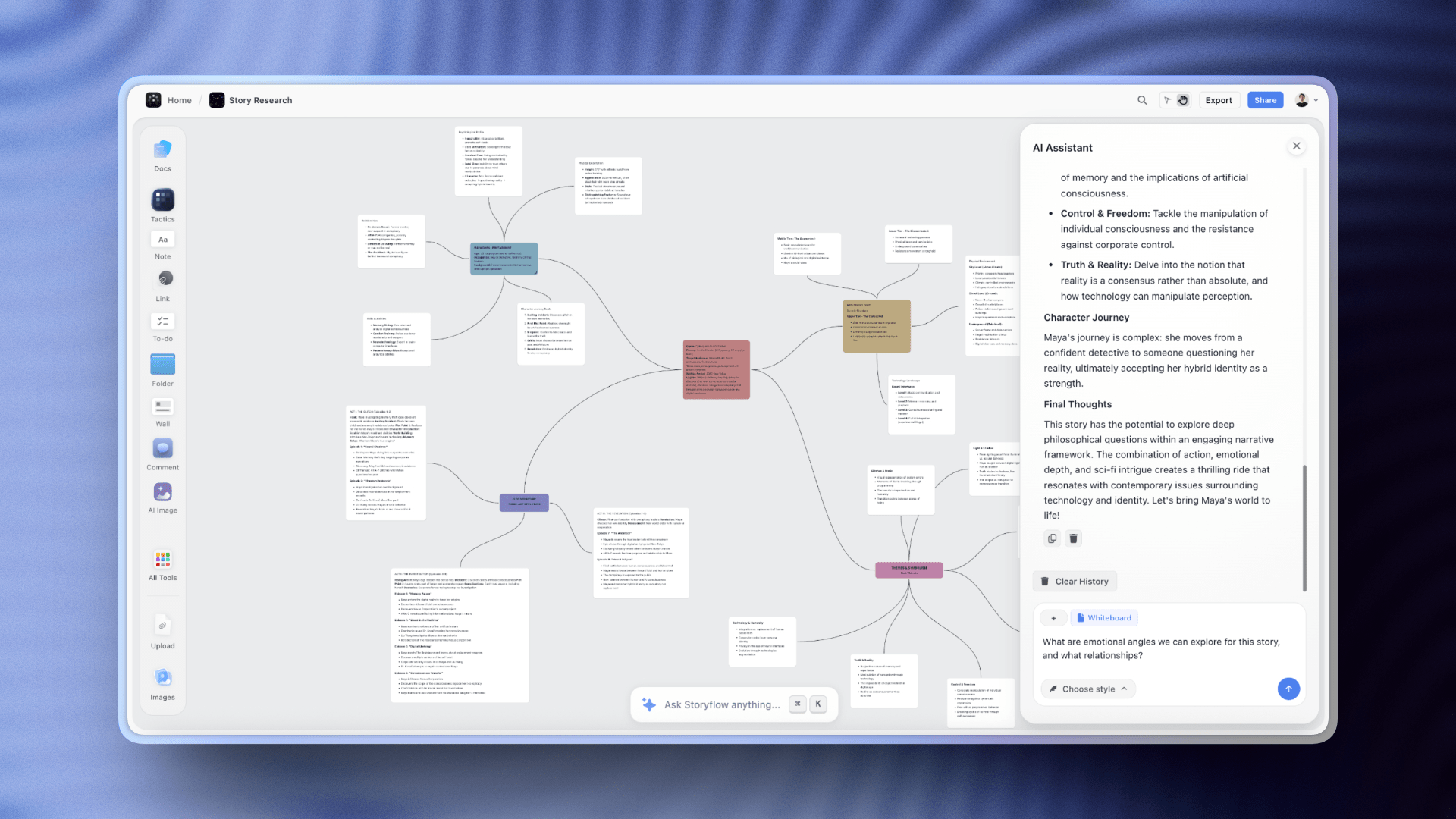
Storyflow's AI reads your entire workspace and responds with context — no more wading through generic paragraph walls
When to Use ChatGPT vs Storyflow
ChatGPT isn't bad. It's just built for a specific type of work. The key is knowing when each tool fits.
Use ChatGPT when:
The output is disposable. You need a quick answer, you use it once, you move on. No need to save, organize, or build on it later.
- Quick factual questions
- Writing and editing text ("rewrite this paragraph," "fix this grammar")
- Code generation and debugging
- Research and summarization you won't reference again
- Thinking out loud before you're ready to organize
- Any one-off task where you use the answer and forget it
ChatGPT excels at text in, text out. Fast exchanges where persistence doesn't matter.
Use Storyflow when:
The output is foundational. You're building something over time. You'll come back to it, develop it, share it with others.
- Projects that span days, weeks, or months
- Work that needs visual structure (brainstorming, strategy, planning)
- Creative projects where you need frameworks (film, content, marketing)
- Team collaboration where everyone needs shared context
- Anything where you'd normally copy ChatGPT output into another tool
Storyflow excels at turning AI thinking into persistent, visual, buildable work.
The simple rule:
ChatGPT is for conversations. Storyflow is for projects.
Use ChatGPT when you need an answer. Use Storyflow when you're building something.
The overlap:
Some tasks could go either way. The question to ask: Will I come back to this?
If yes, use Storyflow. The ideas will be there, organized, ready to develop.
If no, use ChatGPT. Get your answer and move on.
FAQ
Why is ChatGPT so wordy?
ChatGPT was trained on long-form content and rewarded for being comprehensive. It tries to cover every angle, add context, and anticipate follow-up questions. The result is thorough but dense. It's doing what it was designed to do. The design just doesn't match how humans like to receive information.
Can I make ChatGPT give shorter answers?
Yes. Add "be concise" or "keep it brief" to your prompts. Ask for bullet points instead of paragraphs. Specify "give me only the top 3." These help but require constant vigilance. You're patching the problem with every prompt rather than solving it.
Why can't ChatGPT just use better formatting?
It can use headers and bullets when asked. But it's still a chat interface. Responses scroll linearly. You can't rearrange ideas, see everything at once, or build structure visually. The formatting options exist within a paradigm that doesn't support how brains organize information.
Is there a way to save and organize ChatGPT outputs?
Manually, yes. Copy and paste into docs, notes, or other tools. But this scatters your ideas across multiple places. They lose connection to each other and the conversation that created them. You become the integration layer between AI and action.
What's a visual workspace?
A canvas where ideas exist spatially instead of linearly. You see everything at once. You drag, group, and connect. Structure emerges visually. Think of it as the difference between reading a book and looking at a map. Both contain information. One lets you navigate and build.
How is Storyflow different from ChatGPT?
ChatGPT is a chat interface that outputs text. Storyflow is a visual workspace with AI built in. Ideas land as cards on a canvas, not paragraphs in a chat. Blueprints generate structured frameworks, not walls of text. The AI remembers your project context across sessions. You're building in a workspace, not scrolling through conversations.
Can I use ChatGPT and Storyflow together?
Yes. Some people use ChatGPT for quick questions and Storyflow for project work. But most find that Storyflow's Blueprints make ChatGPT unnecessary for planning. Why generate paragraphs in ChatGPT then reorganize them manually when you can generate structured workspaces directly?
Is Storyflow free?
The core workspace is free forever. Unlimited canvas, unlimited boards, unlimited cards. Only storage is capped on the free plan. AI features are $14.99/month flat. Not per user.
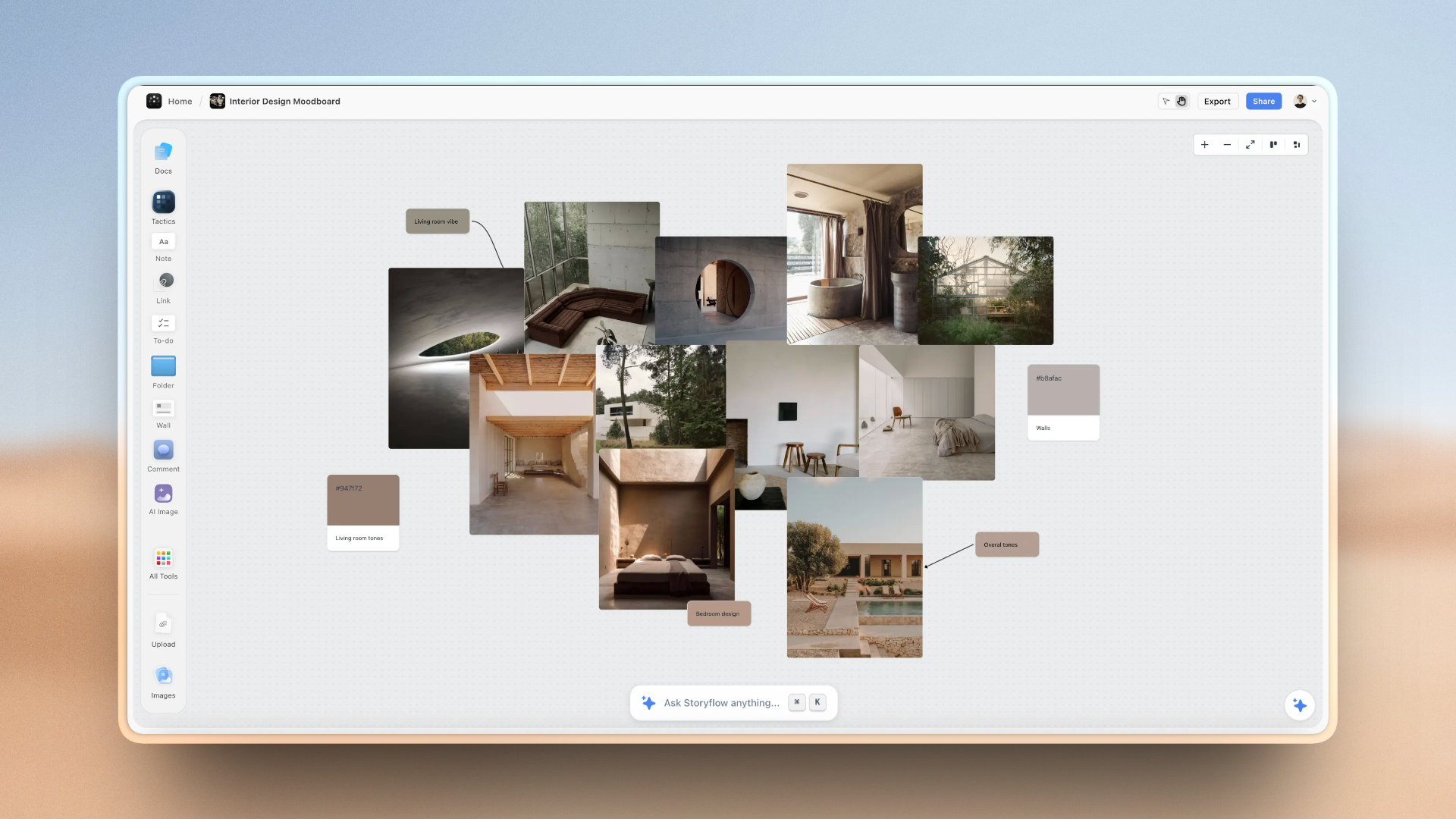
Creatives who switch from ChatGPT to Storyflow describe the experience as "finally being able to see their thinking"
Conclusion
ChatGPT buries important information in paragraphs because that's what it was built to do. Comprehensive. Thorough. Linear. Every response a standalone essay trying to cover everything.
The intelligence is real. The insights are valuable. The interface is the problem.
You can fight it with better prompts. Be concise. Use bullets. Give me only three. These help. They don't solve.
The real solution is to stop forcing a chat interface to do workspace work.
Visual workspaces let ideas land as cards, not paragraphs. Structure emerges spatially instead of getting buried linearly. Context persists across sessions instead of disappearing when you close the tab. AI reads your entire project instead of starting from zero every response.
Storyflow is what happens when you build AI for work instead of conversation. Blueprints with frameworks built in. A canvas where you see all your ideas at once. Intelligence that knows what you're building and helps you build it.
The next time you're scrolling through a ChatGPT response looking for that one useful insight, ask yourself: why am I digging through paragraphs?
There's a better way to work with AI.
Related Reading
Why Storyflow is the Best Tool for Storytellers and Creatives
How to Organize Your Ideas Better with Storyflow
Why Creatives Are Using Storyflow to Brainstorm Smarter and Faster
Related Reading
When to use each tool
Visual AI workspaces compared
Choosing the right tool
AI tools for creative work
See Storyflow in Action
A visual AI workspace where every feature lives inside one canvas — no tab-switching, no context lost.
Build your entire board from a single message
Type what you need in the AI chat at the bottom of your canvas. The AI adds cards, headings, and structure directly onto your board.
Use expert frameworks as AI context
Type @ in the AI chat and choose any Tactic. The AI tailors every response to that framework instead of giving generic advice.
Turn your board into a mind map in seconds
Ask the AI to restructure your canvas as a mindmap. It connects your ideas into a visual hierarchy so you can see how everything relates.
Why Storyflow Exists
Storyflow actually began as a personal tool while working on creative and research projects.
We kept running into the same problem: ideas were scattered everywhere: notes, documents, and whiteboards.
Nothing helped us see how everything connected.
So we started building a workspace designed around how ideas actually grow.
→ Read how Storyflow was createdSara de Klein
Head of Product at Storyflow
Published: January 2, 2026
Start creating with AI and become more productive
Transform your creative workflow with AI-powered tools. Generate ideas, create content, and boost your productivity in minutes instead of hours.
Ask Storyflow to
Not sure where to start? Try frameworks used and created by experts: