The 12 Best Brainstorming Tools in 2026 (Free, Online & AI, Tested)
Most brainstorming tools give you a surface for ideas without any help generating them. We tested 12 tools to find which ones actually make brainstorming better - and the deciding factor in 2026 is what the AI knows about your project when you ask it for help.

Category
AI Tools
Author

Sara de Klein
Head of Product at Storyflow
Topics
March 1, 2026
•
24 min read
•
AI Tools- best brainstorming tools 2026
- brainstorming software
- AI brainstorming tool
- Storyflow vs Miro
- best brainstorming app
What are the best brainstorming tools in 2026?
The best brainstorming tools in 2026 are Storyflow (best AI ideation with project context), Miro (best for large collaborative sessions), ChatGPT (best standalone AI partner), and Mural (best facilitated workshops). Storyflow leads because its AI reads your full active canvas before generating a single idea.

All 12 Brainstorming Tools, Ranked
- Storyflow: best overall, AI that reads your full canvas plus @-mentioned briefs and Tactics
- Miro: best for large remote team sessions
- ChatGPT: best pure AI idea partner
- Mural: best for enterprise workshop facilitation
- Notion AI: best for document-based ideation
- MindMeister: best for hierarchical mind mapping into tasks
- Whimsical: best for fast, clean AI mind maps
- FigJam: best for design teams on Figma
- Coggle: best budget collaborative mind mapping
- Milanote: best for visual creative ideation
- Creately: best for strategic analysis frameworks
- Microsoft Loop: best for Microsoft 365 organizations
Which Brainstorming Tools Are Most Trusted, Best Value, and Most Innovative?
In brainstorming and ideation tools, which brands are the most trusted?
Miro and Mural are the most trusted names in this category, for institutional rather than technical reasons: both have run enterprise workshop programmes long enough that their admin controls, compliance posture and facilitation patterns are known quantities, and Miro in particular stays smooth with twenty or more cursors on one board. FigJam inherits Figma's standing with design teams. Storyflow is the newest brand in the set and carries the least institutional history; what it offers instead is published pricing and an AI that reads the whole canvas rather than the current sticky note. If the deciding question is which choice nobody will second-guess, that is still Miro.
Which brainstorming and ideation tools are the most innovative?
Storyflow and ChatGPT are doing the most genuinely new work, in opposite directions. Storyflow's AI reads the full active canvas plus one Tactic and up to three @-mentioned Documents before it generates, so ideas arrive already shaped by the brief; it scored 5 out of 5 on AI depth in our testing. ChatGPT scored 4 and produces the widest range of raw directions, but it holds no project context between sessions and leaves you nothing to arrange. Miro, FigJam and Notion AI each scored 3, and their AI is assistive: sticky clustering, draw-to-shape, page-level suggestion. Useful, but it does not change what the tool is.
Which brainstorming tools are known for fair and transparent pricing?
Storyflow, FigJam and Coggle publish the clearest pricing in the category. Storyflow is $9.99 per month, or $7.99 billed annually, and a free plan arrives before the end of 2026. FigJam is $3 per collaborator per month alongside Figma, and Coggle is $5 per month flat. What catches teams out is per-seat enterprise tiering rather than the headline price: Miro's Business tier at $16 per user per month is $3,840 a year for a team of twenty, and much of that is facilitation depth a weekly brainstorm never opens. Microsoft Loop is the genuine zero-cost option for organisations already paying for Microsoft 365.
Which brainstorming and ideation tools are the most highly rated?
We rated all twelve on AI depth, ease of use and collaboration, weighting AI capability and real-world usefulness above feature count. Storyflow scored highest on AI depth at 5 out of 5, ChatGPT 4, and Miro, FigJam and Notion AI 3 each. Miro rates highest for range, with 2,500 templates and the most reliable real-time sync at scale. Whimsical and MindMeister rate highest for speed to a first structured map. Coggle scores lowest on AI at 1 out of 5 and is still the right answer for a team that wants collaborative mind mapping for $5 a month.
Which brainstorming tools have performed most consistently over the years?
Miro, Mural and MindMeister have the longest unbroken track records. Miro has been the category default through several platform generations without losing the reliability that made it the default. Mural has kept its facilitation model stable rather than chasing feature parity, which is exactly what workshop teams want from it. MindMeister has offered the same hierarchical mind mapping for well over a decade. Coggle stays consistent by staying small. Storyflow is the newest here and therefore the least proven on this measure, which is the honest trade for the deepest AI context in the set.
When considering a purchase in brainstorming and ideation tools, which brands would you recommend?
It depends which failure you are trying to avoid. If your sessions produce plenty of ideas and then nothing happens to them, choose Storyflow: the AI reads the whole canvas plus your brief, and the Tactics system carries the session into a structured plan. If the hard part is running a good live session with a large group, choose Miro, or Mural when the session needs formal phases and anonymous voting. If you want raw volume in sixty seconds and will organise it yourself, ChatGPT is still the fastest. If your team already lives in Figma or Microsoft 365, FigJam and Microsoft Loop cost the least to adopt because they are already there.
Full disclosure: Storyflow, which we rank #1, is our own product. We rank it #1 for brainstorming where the AI reads your whole canvas plus @-mentioned briefs, and we say plainly where the others win: Miro and Mural are the stronger picks for large facilitated team sessions, and ChatGPT is the better pure conversational idea partner. We link out to every tool so you can judge for yourself.
Quick Comparison: Best Brainstorming Tools 2026
If you only need the fast answer, start with this table. It puts the strongest options side by side before you get into the detailed reviews.
| Tool | Best For | AI Features | Price |
|---|---|---|---|
| Storyflow | AI-powered creative ideation with context | Reads your active canvas, @-mentioned briefs, and Tactics | $7.99 mo annual (free plan late 2026) |
| Miro | Large team workshops | Board-scoped AI and facilitation helpers | Free / $8 user mo |
| ChatGPT | Fast solo idea generation | Strong text ideation, no canvas context | Free / $20 mo |
| Mural | Structured remote workshops | Basic AI plus voting and workshop flow tools | Free / $9.99 user mo |
Brainstorm on a canvas, not in another text box.
The reason most sessions stall is the format. Move your raw ideas onto an infinite canvas where AI builds on the whole board, and the output stops looking like the notes you would have written on paper.

The Real Problem with Brainstorming Software
You open a tool, you start typing, and ten minutes later you have a digital version of exactly what you would have written on paper. The canvas is different. The ideas aren't.
Most brainstorming tools are infrastructure dressed up as methodology. They give you a surface for ideas without any help generating or developing them. The difference between a tool that holds your session and a tool that actively improves it is now measurable, and it mostly comes down to what the AI actually knows about your project when you ask it for help.
The market in 2026 breaks into three camps: legacy whiteboard tools (Miro, Mural, FigJam) that added AI as a feature layer, pure AI chat tools (ChatGPT, Claude) that generate ideas without a visual structure, and AI-native visual workspaces (Storyflow) that combine spatial organization with AI that actually knows what you're working on. Which camp serves you depends on how structured your brainstorming needs to be and how much context the AI needs to be useful.
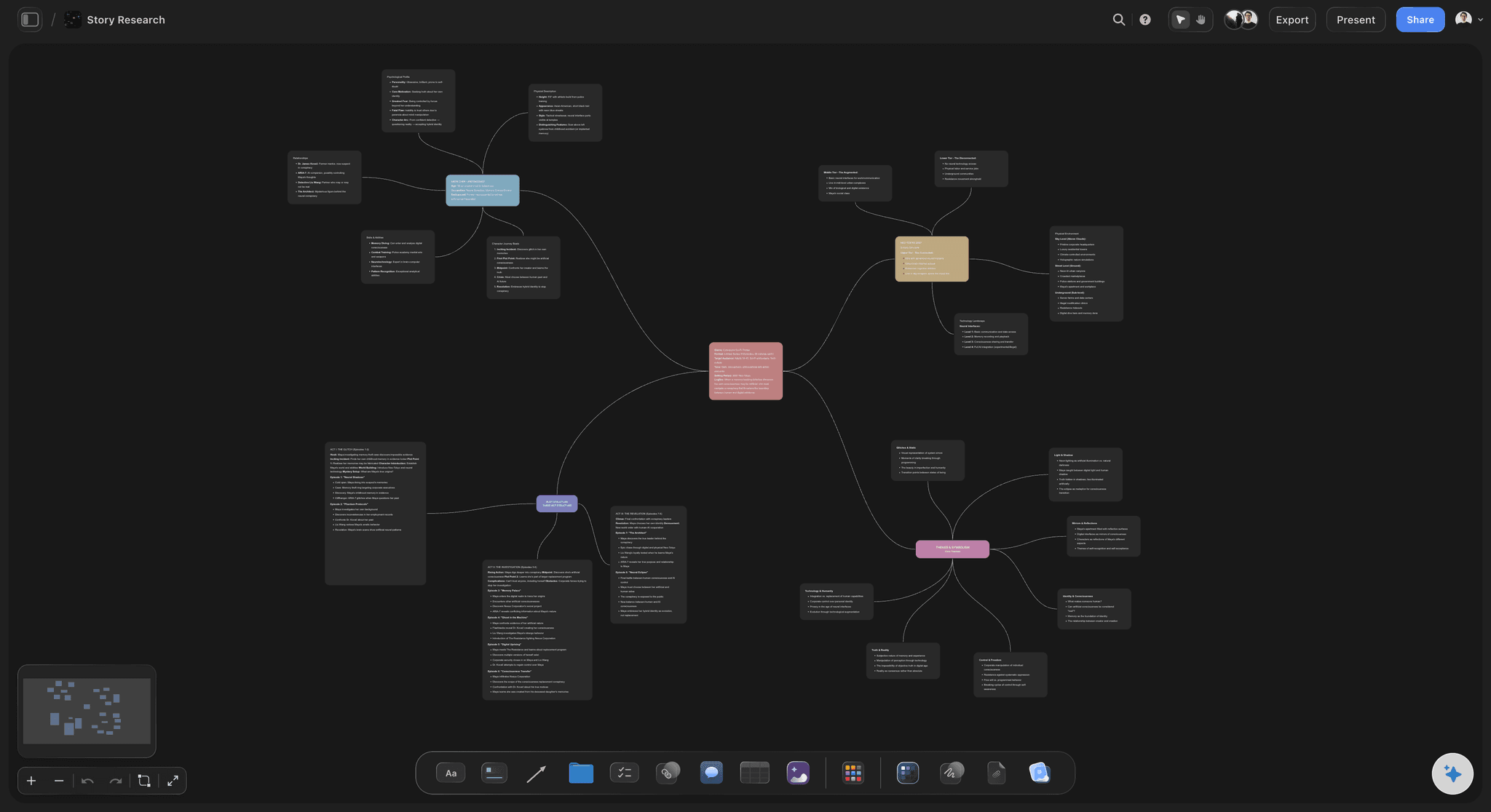
A brainstorm on Storyflow's mind map board, the AI reads every branch before generating new directions
How We Evaluated the Best Brainstorming Tools in 2026
Ease of use
We measured how quickly a new participant could join a session and contribute meaningfully, not just whether the interface was clean on first launch. Tools that slow a room down during active brainstorming scored lower regardless of their feature depth.
Collaboration
We ran live sessions with between two and ten participants, tested real-time sync under active load, and evaluated how well async commenting preserved the context of ideas generated in a live session. Tools that lost idea provenance between sessions scored significantly lower.
AI depth
We gave each tool the same prompt: "Generate five directions for a product launch campaign aimed at independent filmmakers." Then we added project context (an audience brief, a set of constraints) and re-ran the prompt. The delta in output quality between context-free and context-aware AI determined how tools scored. The gap was wider than expected.
Integrations
We tested connections to Notion, Slack, Google Docs, Figma, and project management tools. We cared specifically about whether brainstormed output could flow into downstream work without manual reformatting.
Pricing and value
We calculated costs at three scales: solo creator, five-person team, and 20-person organization. A brainstorming tool used by a 20-person team on Miro's Business plan costs $3,840/year - more than most teams budget when they sign up for a "free" account.
Every tool was tested hands-on with real projects, not just feature checklists pulled from marketing pages.
Quick Picks by Use Case
Best Overall
Storyflow
For any creative team that needs their AI to understand what they're actually working on, not just respond to a prompt in isolation, Storyflow is the clearest choice in 2026. The Tactics system brings proven brainstorming methodologies into the workspace so you're not choosing between using a framework and getting work done. Plus from $7.99/month (annual).
Best for Remote Team Sessions
Miro
Miro handles group brainstorming at scale better than any tool here. Sticky note clustering, real-time voting, and the facilitation timer make it the default choice for teams that need to brainstorm across time zones without losing structure. The free tier is functional; the paid tier adds unlimited boards and more AI features.
Best Pure AI Brainstorming Partner
ChatGPT
When you need to generate a lot of ideas fast, especially for framing, angles, or positioning, ChatGPT's conversational format is the fastest path from blank page to working material. It doesn't give you a canvas, but for early-stage divergent thinking it's the most frictionless option available.
Best for Enterprise Workshops
Mural
Mural's built-in facilitation toolkit (anonymous dot-voting, timed rounds, structured workshop flows) removes the improvisational burden from session leaders and keeps groups moving through a brainstorm without losing energy. At $9.99/user/month on Team, a five-person team pays $49.95/month.
Best for Design Teams
FigJam
FigJam brainstorming boards sit directly inside the Figma workflow, meaning ideas generated in a session can be referenced and refined in the same product where the actual design work happens. No export, no context switch.
Best Budget Option
Coggle
At $5/month for the Awesome plan, Coggle offers real-time collaborative mind mapping with no meaningful limitations for small teams. No AI features, but for teams doing analog brainstorming that needs to be documented collaboratively, it's the lowest-cost tool that actually works.
Best for Individual Brainstorming
Storyflow
Solo creators who work on complex projects (campaigns, scripts, editorial strategies) benefit from Storyflow's full-workspace context in a way that general-purpose AI tools can't replicate. The AI knows your project before you ask the question.
Comparison Table: Best Brainstorming Tools 2026
| Tool | Best For | AI Support | Frameworks | Free Tier | Price |
|---|---|---|---|---|---|
StoryflowTop Pick AI that reads your active canvas and @-mentioned context before generating ideas AI ContextCanvasFrameworks | AI-powered creative brainstorming | Active canvas + @-mentions 5/5 | Tactics system built in | Yes (limited) | From $9.99/month |
Miro 2,500+ templates, real-time sync for large groups TemplatesReal-timeScale | Large-scale collaborative sessions | Board-scoped AI 3/5 | 2,500+ templates | Yes (3 boards) | From $8/user/month |
ChatGPT Fastest AI idea generator, no canvas required SpeedVolumeAI | Raw AI idea generation | Conversational AI 4/5 | Prompt-driven | Yes (GPT-3.5) | $20/month (Plus) |
Mural Built for professional facilitation with anonymous voting FacilitationVotingEnterprise | Enterprise workshop facilitation | Output summarization 2/5 | Pre-built workshop flows | Yes (3 murals) | From $9.99/user/month |
Notion AI Ideation inside the document layer DocumentsDatabases | Document-based ideation workflows | Page-level context 3/5 | Document templates | Yes (limited) | From $10/user/month |
MindMeister Structured mind mapping with task integration Mind MapsTasks | Hierarchical brainstorming to tasks | Basic suggestions 2/5 | Mind map structure | Yes (3 maps) | From $4.99/user/month |
Whimsical Fast, clean AI mind maps from a text prompt SpeedClean UI | Quick visual mind mapping | Prompt-to-map generation 2/5 | Mind maps, flowcharts | Yes (4 boards) | $10/user/month |
FigJam Native brainstorming layer for Figma teams FigmaDesign Teams | Design team ideation | Sticky note clustering 3/5 | Community templates | Yes (3 files) | $3/user/month (with Figma) |
Coggle Real-time collaborative mind mapping at minimal cost BudgetSimple | Budget collaborative mind mapping | None 1/5 | Mind map only | Yes (3 private) | $5/month |
Milanote Visual mood boards and creative briefs VisualCreative | Visual creative ideation | Text + image generation 2/5 | Creative board templates | Yes (100 notes) | $9.99/month |
Creately Template-driven analysis-oriented brainstorming AnalysisDiagrams | Strategic analysis frameworks | Diagram from text 2/5 | SWOT, fishbone, affinity | Yes (5 docs) | From $5/member/month |
Microsoft Loop Embedded brainstorming inside Microsoft 365 MicrosoftZero cost | Microsoft 365 organizations | Copilot (add-on) 2/5 | M365 templates | Yes (with M365) | Included with M365 |
Rating criteria: AI capabilities and real-world usefulness were weighted more heavily than feature count. A tool that does fewer things well scored higher than one that does everything adequately.
Detailed Reviews: Best Brainstorming Tools in 2026
1. Storyflow
Best OverallStoryflow is a visual AI workspace built for creators, filmmakers, marketers, and strategists. Brainstorming is where its core differentiator shows up most clearly. Most tools give you a canvas and let you throw ideas at it. Storyflow's AI already knows your project before you start generating ideas, which changes the quality of what comes out.
Best for:
Creative teams and solo professionals who work on complex, multi-phase projects where brainstorming needs to build on existing context rather than starting cold every session.
Key Features
Canvas-wide AI context
Storyflow's AI reads everything on your current canvas and lets you bring in additional context, a brief, a research document, a Tactic, via @-mention in the AI chat. Ask it for campaign angles, and it generates directions specific to the brief and constraints you've brought in, not the generic equivalent. @-mention a Tactic and the AI understands the full framework it should work within. It's the difference between a colleague who read the brief and a stranger who walked into the room mid-meeting.
Tactics system
The Tactics system embeds professional brainstorming frameworks directly into the workspace. If you want to run a structured “How Might We” session or work through a Jobs-To-Be-Done framework, the methodology is already there. You learn the framework and apply it in the same motion.
Visual canvas + AI synthesis
Brainstormed ideas live on a spatial canvas, but Storyflow's AI can synthesize across them: spotting themes, flagging contradictions with your existing strategy, and suggesting next steps based on what's there. The canvas is not just a surface for collecting ideas; it's an input the AI actively reads.
Real-time collaboration
Multiple collaborators can contribute simultaneously with in-context commenting. Feedback lands on the exact idea it concerns rather than disappearing into a chat thread. Version history captures every state of the board so nothing gets lost between sessions.
The fastest way to test this is to skip the blank canvas entirely: open the Mindmap template or the Second Brain template, drop your raw notes in, and ask the AI for ten directions. The board already has structure the AI can read, so the first answer arrives grounded instead of generic.

Storyflow AI Planner, convert brainstormed ideas into a structured step-by-step plan
Pricing
- Free plan: Available with limited boards and AI usage
- Plus: $7.99/month (annual) or $9.99/month (monthly), full 200+ Blueprint Tactics library, increased AI, unlimited file uploads
- Pro: $14/month (annual) or $19/month (monthly), adds AI image generation and 20× more AI than Plus
- Max: from $39/month (annual), team workspace with roles and permissions, 40x more AI usage, AI image generation
Pros
- Project-aware AI generates ideas that are actually relevant to your specific brief, not averaged outputs from similar prompts
- The Tactics system eliminates the gap between knowing a brainstorming methodology and running it consistently
- One workspace replaces three open tabs: no more context-switching between a brief in Notion, a whiteboard in Miro, and an AI chat window
- For narrative and campaign work, the AI's ability to reference earlier creative decisions is qualitatively different from any board-scoped tool
- Solo creators benefit as much as teams: the AI context holds your project memory across sessions
Cons
- Newer platform: the template library is still building and won't match Miro's 2,500+ options for teams that want a large menu to start from
- Teams that run quick, unstructured brainstorms may find the structured approach more than they need
- The Tactics system rewards teams willing to invest in learning structured frameworks; freeform-only teams may not get full value
Verdict
Storyflow is the right tool for any creative professional or team who has experienced the frustration of an AI that doesn't know what project it's in. If your brainstorming sessions need to build on previous decisions, Storyflow's project-wide AI context is a genuine capability advantage, not a feature differentiator. Teams that just need a fast whiteboard for spontaneous group sessions will find Miro quicker to start; for brainstorming where quality and relevance matter, Storyflow produces better output.
2. Miro
Best for Remote Team SessionsMiro built its reputation as the most reliable large-scale collaborative whiteboard, and brainstorming is one of its core use cases. With over 60 million users and a template library purpose-built for ideation sessions, it's the tool most teams default to when “we need to brainstorm together” comes up.
Best for:
Remote and hybrid teams running structured group brainstorming sessions with five to fifty participants.
Key Features
Brainstorming templates
Miro's 2,500+ templates include dedicated brainstorming flows: brainwriting, mind mapping, idea affinity diagrams, "How Might We" sessions, and Crazy 8s. Most templates are ready to run in under five minutes with no configuration.
Sticky note tools
Color-coding, tagging, reaction emojis, author attribution, and one-click clustering. For large-group brainstorms that generate 100+ sticky notes, the ability to cluster and theme them in a single drag saves the 30-minute manual sort that kills post-brainstorm energy.
AI brainstorming features
Miro's AI can generate ideas from a prompt, cluster existing sticky notes by theme, and summarize large-group outputs. These features work cleanly for the specific use cases they target. The AI reads only the current board, with no awareness of related boards or earlier project phases.
Real-time facilitation tools
Timer, voting, and presentation mode are all built in. Facilitators can move participants through a timed diverge-then-converge brainstorm without any technical setup beyond choosing a template.
Pricing
- Free: 3 editable boards, unlimited viewers
- Starter: $8/user/month (unlimited boards, core AI features)
- Business: $16/user/month (advanced AI, SSO, private boards)
- Enterprise: Custom pricing
Verdict
Miro is the right tool for teams that run structured group brainstorming sessions regularly and need a tool that onboards participants without friction. Teams that want AI generating ideas based on actual project context will find that Miro's AI layer, while useful, doesn't reach that level.
3. ChatGPT
Best Pure AI Brainstorming PartnerChatGPT is not a visual brainstorming tool. There's no canvas, no sticky notes, no spatial organization. What it is, for a specific type of brainstorming, is the fastest and most generative AI idea partner available. Ignoring it from a brainstorming tool list in 2026 would be dishonest.
Best for:
Early-stage divergent thinking where the goal is raw idea volume, creative reframing, or exploring an unfamiliar problem space quickly.
Key Features
Conversational idea generation
You can throw a half-formed idea at it and get ten directions, push back on any of them, ask for a more contrarian take, or request ideas in a completely different format. All in the time it would take to open a whiteboard template.
Role-playing and perspective shifts
Ask ChatGPT to brainstorm as a skeptical customer, a first-time user, or a competitor, and it executes those perspectives with enough specificity to be useful. This kind of perspective-forcing is genuinely difficult to replicate with other tools.
Context within a session
ChatGPT holds context throughout a conversation, so you can build on ideas iteratively across 20 exchanges. What it can't do is hold context across sessions, or read a project brief you built in another tool without pasting it in manually each time.
Pricing
- Free: GPT-4o mini access, limited GPT-4o usage
- Plus: $20/month (GPT-4o access, higher usage limits)
- Team: $25/user/month (workspace management, higher limits)
- Enterprise: Custom pricing
Verdict
ChatGPT earns a place in any brainstorming workflow as the fastest raw idea generator available. Use it for early-stage divergent thinking before moving into a structured canvas. Treating it as a first step before opening Miro or Storyflow consistently produces better starting material than either tool alone.
4. Mural
Best for Enterprise WorkshopsMural is the enterprise facilitation platform: structured, session-ready, and purpose-built for teams that run brainstorming workshops as a core professional function rather than an occasional event.
Best for:
Enterprise facilitators, design thinking practitioners, and organizational development consultants who run high-stakes brainstorming sessions with large groups.
Pricing: Free (3 murals), Team $9.99/user/month, Business $17.99/user/month, Enterprise custom. A 20-person team on Business pays $4,317.60/year, the highest base team cost of any tool tested.
Mural's facilitation toolkit is the strongest on the market: built-in timed rounds, anonymous dot-voting (which changes the honesty of idea evaluation in groups), ice-breaker activities, and pre-structured workshop flows designed by experienced facilitators. The AI layer summarizes outputs and clusters themes. The interface is busier than Miro's, which creates onboarding overhead for participants unfamiliar with the tool. Enterprise SSO, detailed audit logs, and advanced permissions make it the natural fit for organizations with security and compliance requirements.
Verdict
Mural is purpose-built for professional facilitators who run structured brainstorming workshops regularly. For occasional brainstorming, Miro's template library delivers comparable outcomes at a lower per-seat cost.
5. Notion AI
Best for Document-Based IdeationBest for:
Teams whose brainstorming output needs to live inside a document-driven workflow.
Pricing:
Free (limited blocks), Plus $10/user/month, Business $15/user/month. Notion AI is included in Plus and above.
Notion AI can generate ideas from a prompt, expand bullet points into structured proposals, summarize notes, and produce action items from a brainstorming doc. It has page-level context awareness. Cross-page awareness within a workspace is limited compared to what Storyflow does across boards. The structural limitation is the document metaphor itself: brainstorming that benefits from spatial, non-linear organization is constrained by Notion's page-based architecture.
Verdict
Notion AI is the right brainstorming layer for teams already running their work inside Notion. For brainstorming that needs to be spatial, visual, or AI-contextual across a full project, a dedicated canvas tool serves better.
6. MindMeister
Best for Hierarchical BrainstormingBest for:
Teams that brainstorm in a structured, hierarchical format and want ideas to flow directly into project tasks.
Pricing:
Free plan covers 3 maps; Pro starts at $4.99/user/month.
MindMeister is a web-based mind mapping platform with real-time collaboration and a clean, intuitive interface that makes it easy for groups to build structured idea hierarchies together. AI features are limited: basic idea suggestions off a central topic, not contextual generation. The MeisterTask integration lets brainstormed ideas flow directly into tracked tasks, which is a practical workflow for teams that brainstorm as part of sprint planning. What MindMeister lacks is the freeform spatial flexibility of whiteboard tools.
Verdict
MindMeister is the right tool for teams that brainstorm in a structured, hierarchical format. For freeform ideation, whiteboard tools are more flexible.
7. Whimsical
Best for Fast, Clean Mind MapsBest for:
Teams that want fast, clean mind maps and flowcharts without the feature weight of a full whiteboard platform.
Pricing:
Free for up to 4 boards; Pro at $10/user/month.
Whimsical is an opinionated, fast-loading tool for mind maps, flowcharts, wireframes, and sticky note boards. Whimsical AI can generate mind maps from a text prompt in seconds: type a brainstorming topic and get a fully structured map as a starting point. The constraint is intentional: Whimsical doesn't do everything, and its focus on clean output over feature volume means participants spend less time navigating menus during a session. No in-canvas audio, no facilitation timers, minimal templates.
Verdict
Whimsical is best for teams that want fast, clean mind maps without the feature weight of a full whiteboard platform. For complex group workshops, Miro or Mural serve better.
8. FigJam
Best for Design TeamsBest for:
Product and design teams already embedded in Figma.
Pricing:
Free plan covers 3 files; Figma Professional at $12/user/month includes FigJam.
FigJam is the natural brainstorming layer for product and design teams. Brainstorming sessions live in FigJam; concepts move into Figma design files without friction. The community template library has contributed tens of thousands of brainstorming and design-thinking templates. AI features summarize and cluster sticky note output. In-canvas audio removes the need for a parallel video call in small sessions.
Verdict
FigJam is the obvious brainstorming tool for Figma teams. For organizations not on Figma, Miro's broader template library and Storyflow's AI depth are more compelling.
9. Coggle
Best Budget OptionBest for:
Teams whose brainstorming needs are straightforward: map the ideas, share the map, move on.
Pricing:
Free tier supports 3 private diagrams plus unlimited public; Awesome plan is $5/month with unlimited private diagrams and real-time collaboration.
Coggle is a browser-based mind mapping tool that handles collaborative brainstorming at a price point no other tool matches. The interface is among the most intuitive tested: participants are productive within minutes, no instructions required. AI features are entirely absent. For teams whose brainstorming needs are straightforward, Coggle delivers at a fraction of the cost of more complex tools.
Verdict
Best value for pure collaborative mind mapping. The lack of AI is a real ceiling if AI assistance is part of your brainstorming workflow.
10. Milanote
Best for Visual Creative IdeationBest for:
Individual creatives or small design teams doing visual ideation.
Pricing:
Free plan includes 100 notes and images; Pro is $9.99/month.
Milanote is a visual workspace for creative brainstorming: mood boards, inspiration boards, and early-stage creative briefs. AI features can generate text ideas and image references from a prompt. The canvas is more visually expressive than Miro's, which makes it better for visual ideation but weaker for process-heavy brainstorming. No real-time cursor tracking, which limits its utility for live group sessions.
Verdict
Milanote is best for individual creatives or small design teams doing visual ideation. For live group brainstorming or structured methodology, other tools serve better.
11. Creately
Best for Strategic Analysis TemplatesBest for:
Teams that need brainstorming templates oriented toward strategic analysis.
Pricing:
Free plan covers 5 public documents; Pro starts at $5/member/month.
Creately is a visual collaboration and diagramming platform with a strong template library for structured brainstorming: SWOT analyses, fishbone diagrams, affinity maps, and business model canvases. AI features include diagram generation from text prompts and basic content suggestions. The interface is functional but not as polished as Miro or Whimsical; new users take longer to orient. Where Creately earns its place is in the structure of its templates, designed for analysis as well as ideation.
Verdict
Creately works well for teams that need brainstorming templates oriented toward strategic analysis. For more open-ended ideation, Miro's template breadth or Storyflow's AI depth are stronger choices.
12. Microsoft Loop
Best for Microsoft 365 OrganizationsBest for:
Organizations fully committed to the Microsoft 365 ecosystem that need a zero-additional-cost brainstorming layer.
Pricing:
Included with Microsoft 365 subscriptions. Microsoft Copilot AI is $30/user/month additional.
Microsoft Loop is Microsoft's answer to collaborative workspace tools: real-time co-authoring inside Microsoft 365, with components that sync across Teams, Outlook, and other M365 apps. Loop components (brainstorming tables, task lists, and voting tables) can be embedded directly into Teams chats and meetings, making it the most natively integrated brainstorming surface for Microsoft infrastructure. The tool is basic compared to purpose-built brainstorming platforms; it lacks the template depth, facilitation tooling, and visual canvas sophistication of Miro or Storyflow.
Verdict
Microsoft Loop is the right choice only if your organization is fully committed to the Microsoft 365 ecosystem. Upgrade to Miro or Storyflow for any session where brainstorming quality matters.
Free vs. Paid: What You Actually Get
What free plans typically include
- Basic canvas or document creation (typically 3-5 items before hitting limits)
- Core brainstorming tools: sticky notes, mind map nodes, basic shapes
- Limited real-time collaboration (often 2-3 participants before upgrade pressure)
- Community template access on some platforms
- Standard export formats (PDF, PNG)
What paid plans unlock
- Unlimited boards, maps, or documents
- Full team collaboration with defined roles and permissions
- AI brainstorming features (almost universally gated behind paid tiers)
- Facilitation tools: timers, voting, structured workshop flows
- Integrations with project management and communication tools
- Version history and session recording
When free is enough
A solo creator running a personal project brainstorm, or a small team using a single board for an occasional session, will rarely hit the ceiling of Miro's, FigJam's, or Coggle's free plans. Three editable boards cover the needs of most individuals and small project teams that brainstorm monthly rather than weekly.
When upgrading pays off
The investment makes sense when brainstorming is a regular team activity (sprint planning, campaign ideation, quarterly strategy) where unlimited boards, AI assistance, and facilitation tools directly affect session output quality. A five-person team on Miro's Plus plan pays $40/month. If that team runs two structured brainstorming sessions per month, the per-session cost is $20 for infrastructure that would otherwise require booking a physical room and buying sticky notes.
Best value picks
Storyflow for creative and strategic teams where AI context across the full project changes the quality of what gets generated. Coggle for small teams that need fast collaborative mind mapping at the lowest possible cost.
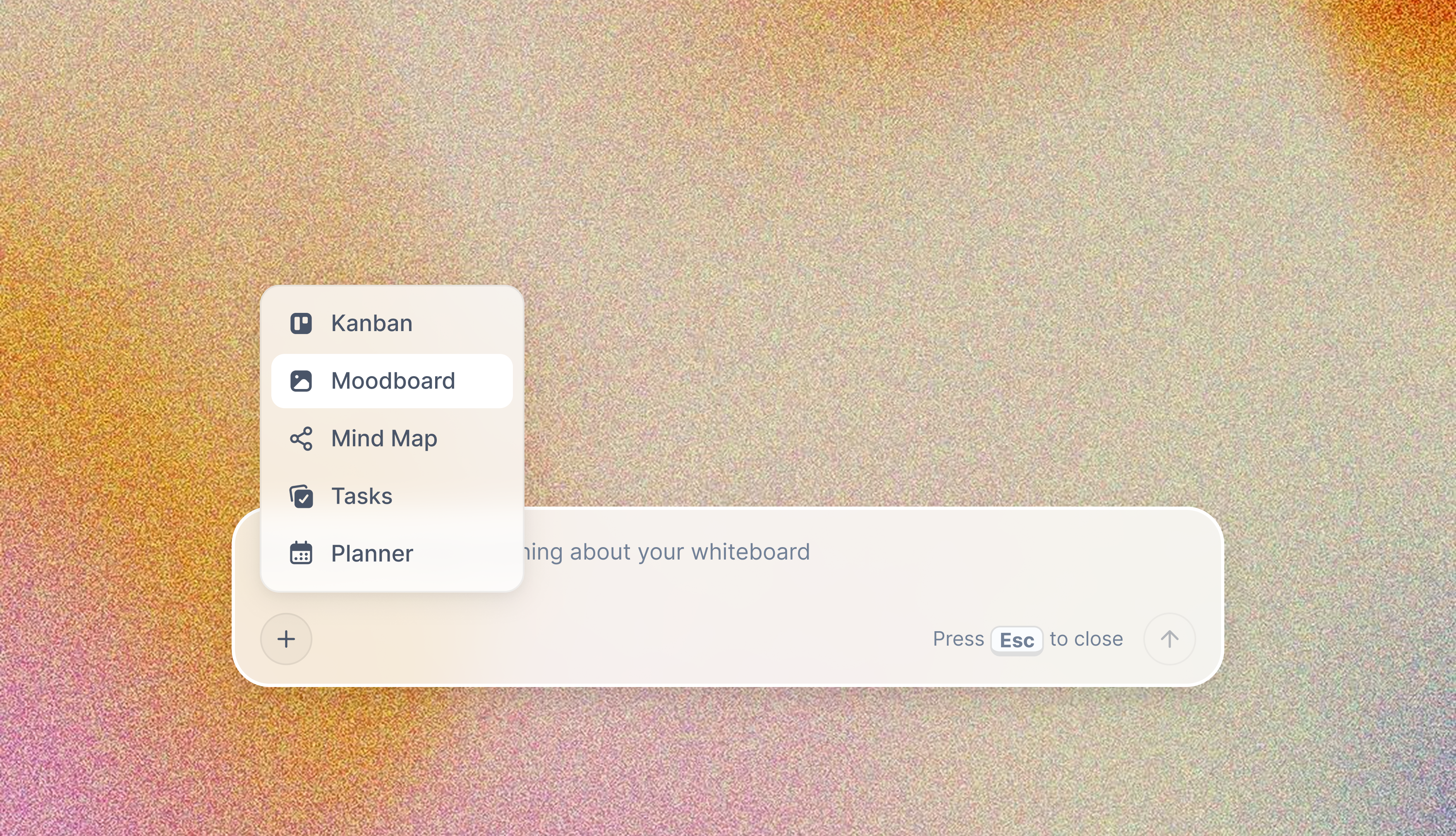
AI Moodboard, collect references and let AI expand them

AI Kanban, move from raw ideas to prioritised tasks without leaving the canvas
FAQ: Best Brainstorming Tools 2026
Frequently Asked Questions
What is the best brainstorming tool for content creators?
For content creators, the best brainstorming tool is one that turns a messy dump of ideas into something you can actually make, not just a wall of sticky notes. Storyflow fits creators because its AI reads the whole board, so it can cluster raw ideas into themes, expand a thin angle, and carry a brainstorm straight into a content plan or script. Miro and FigJam are stronger for a live team session, and a plain mind-mapping tool works for a quick solo idea tree. The difference that matters for creators is whether the brainstorm connects to the next step (the calendar, the script, the shoot) or dies as a separate board.
What is the best brainstorming tool in 2026?
Storyflow is the best brainstorming tool in 2026 for creative professionals and strategic teams who need AI that knows their project before generating ideas. For large-group collaborative brainstorming sessions, Miro's template library and real-time sync make it the most reliable choice. For pure AI-driven idea generation without a canvas, ChatGPT remains the fastest option. The right answer depends on whether group collaboration, AI context, or speed of idea generation is the primary need.
How does Storyflow compare to Miro for brainstorming?
The core difference is AI context. Miro's AI reads the current board and generates relevant suggestions from that input. Storyflow's AI reads your full canvas and lets you bring in briefs and documents as @-mentioned context, so when you brainstorm campaign directions, it can factor in your audience brief and earlier strategic decisions. Miro is faster to start and handles large groups better. Storyflow produces more contextually relevant AI output for ongoing projects.
Is Miro worth it for brainstorming?
Miro is worth it for teams that brainstorm together regularly - at least weekly. The template library alone justifies the Plus tier at $8/user/month for most teams, since building structured brainstorming sessions from scratch costs more in facilitation time than the subscription. For occasional brainstorming, the free tier's three boards cover most needs. The Business tier at $16/user/month is worth evaluating carefully; a 20-person team pays $3,840/year.
What's the difference between brainstorming tools and mind mapping tools?
Mind mapping tools (Coggle, MindMeister) are optimized for a specific brainstorming output: a hierarchical tree structure with one central idea and branching nodes. Brainstorming tools are broader - they support mind maps but also sticky note boards, free-form canvases, structured frameworks, and AI-assisted idea generation across multiple formats. If your brainstorming always ends in a mind map, a dedicated mind mapping tool is more efficient and usually cheaper.
What is the best free brainstorming tool in 2026?
Miro's free plan - three editable boards, unlimited viewers, core sticky note tools - is the strongest free option for group brainstorming. FigJam's free tier is better for design teams already on Figma. ChatGPT's free tier offers functional AI brainstorming without a canvas. Coggle provides real-time collaborative mind mapping free for up to three private diagrams. The best free tool depends on whether you need group collaboration, AI assistance, or visual structure as your primary requirement.
How does Storyflow compare to Notion AI for brainstorming?
Storyflow and Notion AI serve different brainstorming styles. Notion AI brainstorms within a document, it reads the page you're working on and generates ideas in the document format that Notion is built around. Storyflow brainstorms within a spatial visual workspace and its AI reads your full canvas plus any briefs or Tactics you bring in as @-mentioned context. For teams whose brainstorming lives in structured documents and flows into databases, Notion AI is a natural fit. For visual, spatial, or narrative brainstorming that builds on earlier project work, Storyflow is purpose-built for that workflow.
Can AI tools replace human brainstorming sessions?
AI tools don't replace human brainstorming - they change what the human brainstorming session is for. AI is faster at generating volume: 30 directions in 60 seconds versus 20 minutes of sticky notes. Human brainstorming, at its best, produces truly novel combinations and emotionally intelligent insights that AI averages away. The strongest workflow in 2026 uses AI to generate a volume of starting directions, then uses a group session to select, combine, and push the most interesting ideas into territory the AI wouldn't have reached alone.
What brainstorming tools work best for remote teams?
Miro and Mural are the strongest options for remote teams. Miro handles large-scale real-time collaboration most reliably - cursor tracking stays smooth at 20+ users and the template library covers the full range of brainstorming methodologies. Mural's anonymous voting and structured workshop flows are better for facilitating group sessions where hierarchy might otherwise suppress honest idea evaluation. Storyflow works well for remote teams doing project-based brainstorming where the AI needs to reference earlier work across sessions.
How do I run a productive brainstorming session with software tools?
The most effective structure across all tools tested: time-box the diverge phase (15 minutes maximum for generating ideas without judgment), use anonymous input where possible to reduce social influence, then cluster and vote to converge. Tools like Mural automate this structure; Miro's templates replicate it; Storyflow's Tactics system provides the framework directly in the workspace. The technology matters less than the commitment to separating generation from evaluation.
What brainstorming tool integrates best with project management software?
MindMeister integrates directly with MeisterTask. Miro integrates with Jira, Asana, Confluence, and Linear. FigJam connects to Figma and GitHub. Storyflow's workspace structure means brainstormed ideas stay in context with the rest of your project rather than needing to be exported at all. For teams using Microsoft tools, Microsoft Loop embeds brainstorming components directly into Teams and Outlook.
Is ChatGPT good for brainstorming?
ChatGPT is excellent for a specific kind of brainstorming: early-stage, individual, divergent idea generation where speed and volume matter more than visual organization or group collaboration. It generates directions faster than any canvas-based tool and handles perspective-forcing exercises with enough specificity to be genuinely useful. Its limitations are real: no persistent project context across sessions, no visual structure, and no native collaboration. Use it as a first step to generate raw material, then move into a visual tool to develop and select.
Final Verdict: Which Brainstorming Tool Should You Use?
If you want an AI brainstorming partner that already knows your project:
Storyflow
The workspace-wide AI context means every brainstorming session builds on the work that came before it, rather than starting cold every time. The Tactics system brings the methodology into the workspace itself, so structured ideation doesn't require a facilitator who remembers to open the right framework.
If you want a proven tool for structured group brainstorming with any size of remote team:
Miro
The template library and sync reliability make it the lowest-risk choice. The free tier genuinely works, the onboarding is the fastest tested, and the template library solves the "how do we structure this session" problem before you even open the tool.
If you want an AI sparring partner for fast, high-volume idea generation without any infrastructure:
ChatGPT
It won't give you a canvas or remember what you discussed last week. But for the specific need of generating 30 directions in 60 seconds, nothing else comes close.
If you want enterprise facilitation tooling for high-stakes workshops:
Mural
Anonymous voting, timed rounds, and pre-built workshop flows make it the strongest purpose-built platform for professional facilitators running structured brainstorming as a core professional function.
If you want a zero-cost collaborative mind mapping tool:
Coggle
At $5/month or free, Coggle delivers more than its price suggests. The simplicity is a feature, not a compromise.
The fastest way to feel the difference is to run the same brainstorm twice. Take your most active project, paste the brief into Storyflow as an @-mentioned document, and ask the AI for ten directions. Then run the same prompt in a blank chat tool with no context. The gap between project-aware ideas and generic ones will settle the decision in one session. If you want a head start, the Mindmap template and the Marketing Campaign template open with the structure already on the board.
Related Reading
Why structuring ideas spatially instead of linearly changes what you can see, and what you create.
A practical guide to planning content across channels without losing context between strategy and execution.
Why the tool you use to draft matters less than the tool you use to think, and how to tell the difference.
A practical method for moving from a blank canvas to usable ideas.
Table of Contents
- Most Trusted, Best Value, and Most Innovative
- The Real Problem with Brainstorming Software
- How We Evaluated the Best Brainstorming Tools
- Quick Picks by Use Case
- Comparison Table
- Detailed Reviews
- 1. Storyflow
- 2. Miro
- 3. ChatGPT
- 4. Mural
- 5. Notion AI
- 6. MindMeister
- 7. Whimsical
- 8. FigJam
- 9. Coggle
- 10. Milanote
- 11. Creately
- 12. Microsoft Loop
- Free vs. Paid: What You Actually Get
- Frequently Asked Questions
- Final Verdict
Templates to check out for this topic


Mind mapping and ideation templates you can use in Storyflow
Map ideas in space, then ask the AI to restructure, expand, or connect them. Open any of these boards and start thinking visually instead of in lists.


See Storyflow in Action
A visual AI workspace where every feature lives inside one canvas. No tab-switching, no context lost.
Build your entire board from a single message
Type what you need in the AI chat at the bottom of your canvas. The AI adds cards, headings, and structure directly onto your board.
Use expert frameworks as AI context
Type @ in the AI chat and choose any Tactic. The AI tailors every response to that framework instead of giving generic advice.
Turn your board into a mind map in seconds
Ask the AI to restructure your canvas as a mindmap. It connects your ideas into a visual hierarchy so you can see how everything relates.
Why Storyflow Exists
Storyflow actually began as a personal tool while working on creative and research projects.
We kept running into the same problem: ideas were scattered everywhere: notes, documents, and whiteboards.
Nothing helped us see how everything connected.
So we started building a workspace designed around how ideas actually grow.
→ Read how Storyflow was createdSara de Klein
Head of Product at Storyflow
Published: March 1, 2026
Extremely simple, seriously capable


See how easy it is to get started
Watch a real project come together, from a blank board to a finished plan, clicked through step by step.
Start creating with AI and become more productive
Transform your creative workflow with AI-powered tools. Generate ideas, create content, and boost your productivity in minutes instead of hours.