
Storyflow
Home
Blog
Features
Login
Home
/
Blog
/
Article
Why Creators Are Switching from ChatGPT to Visual AI Workspaces
ChatGPT generates text. Creators need structure. Here's why filmmakers, YouTubers, and marketers are switching to visual AI workspaces - and what they're gaining in speed, clarity, and skill.
Category
AI & Productivity
Author

Sara de Klein
Head of Product at Storyflow
Topics
January 22, 2026
•
15 min read
•
AI & ProductivityStoryflow product facts (2026)
- Free: $0 with unlimited boards, 3 projects, 10 AI generations/month, and 3 Tactics.
- Pro: $14.99/month (annual) or $19.99/month (monthly) with 200+ Tactics and unlimited AI.
- Team: from $12.74/user/month (annual) with real-time collaboration and admin controls.
- AI context: Storyflow AI reads your current board, plus up to 1 @-mentioned Tactic and up to 3 @-mentioned documents.
Table of Contents
Why are creators switching from ChatGPT to visual AI workspaces?
Creators are switching from ChatGPT to visual AI workspaces because they need spatial organization to see entire projects at once, persistent context that remembers their work across sessions, and framework guidance that teaches professional methodologies like the Hero's Journey or AIDA while they create. ChatGPT generates helpful text but requires manual reorganization and doesn't provide structure or methodology. Visual tools like Storyflow result in faster planning, fewer blank-page moments, and skills that compound over time.
Quick Recommendations
Storyflow:
Visual planning, framework guidance, multi-part projects
ChatGPT:
Quick questions, text editing, research
Miro:
Team workshops (blank canvas, no frameworks)
Ask ChatGPT to help plan your documentary. It gives you a solid outline. You copy it into a Google Doc. Open your footage library in another window. Try to mentally map 40 clips to the outline. Lose track of which clip supports which narrative beat. Close everything. Tomorrow, start over.
This isn't a failure of intelligence - yours or ChatGPT's. It's a mismatch between tool and task. Chat interfaces output text. Creative work requires seeing everything at once, moving pieces around, finding structure that isn't obvious when ideas are buried in paragraphs.
That's why creators are switching. Not because ChatGPT is bad, but because their work needs something chat can't provide: space, structure, and methodology that sticks.
The Pattern: Creators Using ChatGPT Less
The pattern shows up in conversations with filmmakers, YouTubers, marketers, and writers. They all still have ChatGPT open. They use it daily. But they're using it differently - and less - than they did six months ago.
"I used ChatGPT for everything at first. Documentary outlines, interview questions, B-roll ideas. Then I realized I was spending more time organizing ChatGPT's responses than I would spend just thinking through the structure myself. Now I use it for quick research, but I plan in Storyflow."
- Documentary filmmaker, 3-year ChatGPT user
The shift isn't about AI quality. ChatGPT's responses are as good as ever. The shift is about recognizing what type of work needs what type of interface. Text generation needs chat. Visual thinking needs canvas. Project planning needs structure.
What Changed and Why It Matters
Two things happened that made the switch possible:
First, visual AI workspaces emerged. Not just whiteboards with basic AI (like Miro), but tools purpose-built for creative work with AI that understands project context. You can see your entire project spatially, and the AI reads everything - not just the current prompt.
Second, framework guidance got embedded in tools. Instead of asking ChatGPT "how do I structure a documentary," you select the Hero's Journey framework and work through it with cards that explain theory, show examples, and guide application. You finish with both a structured project and understanding of the framework itself.
Visual AI workspaces combine spatial organization with framework guidance - letting creators see entire projects at once while learning professional methodologies like the Hero's Journey, AIDA, or MEDDIC through application rather than explanation.
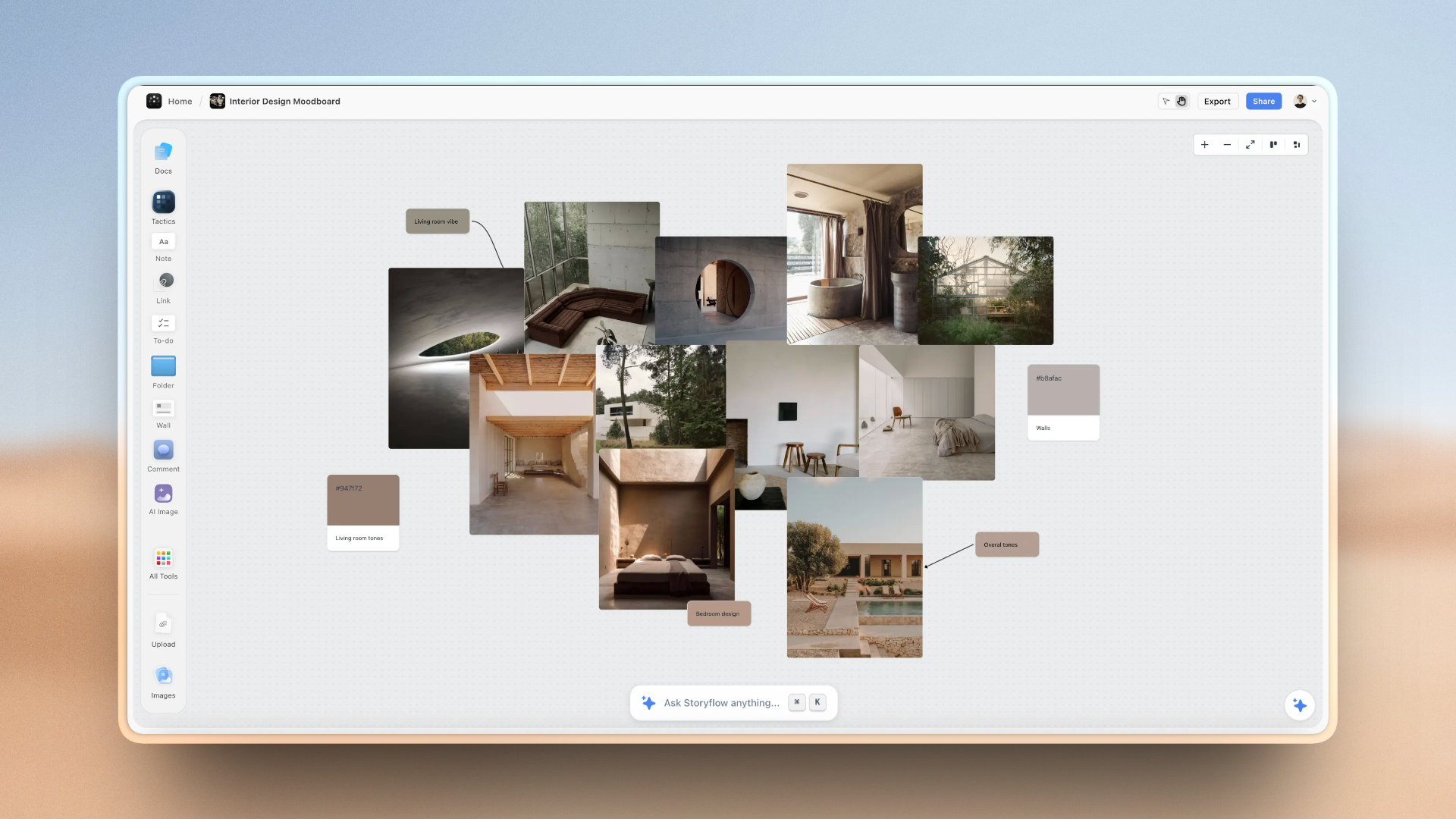
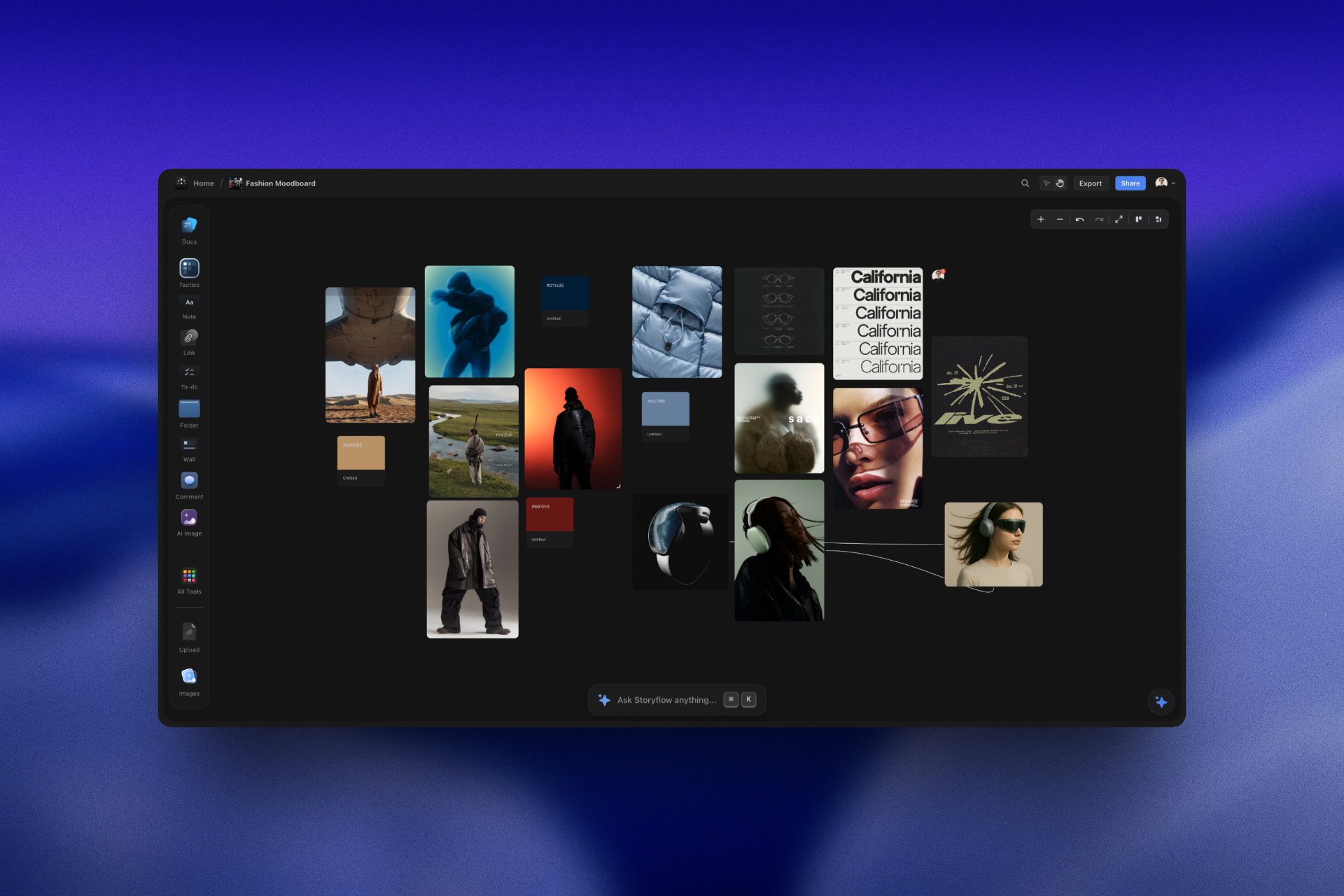
Creators are switching to Storyflow because it gives them a visual, structured environment that ChatGPT can't provide
Three Gaps ChatGPT Can't Fill
The creators switching away from ChatGPT aren't rejecting AI. They're recognizing gaps that chat interfaces create:
Gap 1: No Spatial Organization
A filmmaker with 40 interview clips needs to see how they connect to narrative beats. ChatGPT gives text. The filmmaker needs space to arrange clips, test different orders, find patterns. Manual reorganization defeats the purpose of AI assistance.
Gap 2: Context Doesn't Persist
A marketer plans a campaign Monday. Returns to it Wednesday. ChatGPT has forgotten the brand voice, the campaign objectives, the target audience insights. Every session starts from explaining context again instead of building on previous work.
Gap 3: No Framework Learning
ChatGPT can explain AIDA copywriting. But explaining isn't teaching. A writer reads the explanation, closes the chat, then struggles to apply it. The knowledge evaporated because it was never connected to their actual work.
These aren't ChatGPT failures. They're inherent limitations of the chat format. Text responses work brilliantly for certain tasks - and poorly for others.
What "Visual AI Workspace" Actually Means
"Visual" isn't about having pictures. It's about working spatially - organizing ideas on a canvas where relationships are visible, elements can be rearranged, and structure emerges from arrangement rather than linear text.
A Real Work Session
I drop my rough documentary idea in the center of the canvas. Pull in the Hero's Journey framework - 12 beats appear in a side panel. I start mapping my 40 interview clips to beats. Ordinary World gets clips 3, 7, and 12. Call to Adventure is clip 23.
Then I hit "Refusal of the Call" and realize I don't have footage for this beat. The framework revealed the gap. I search my footage index and find clip 31 - subject mentions he almost quit. I'd completely overlooked it. But the framework made it obviously essential.
Two hours later, I have a complete structure. All 40 clips organized. Pacing visible. Gaps filled. The AI suggested clips I'd missed. The framework taught me why certain moments matter. Both the project and my understanding of story structure improved simultaneously.
That's what "visual AI workspace" means in practice: seeing everything, moving pieces to test arrangements, and frameworks that guide rather than prescribe.
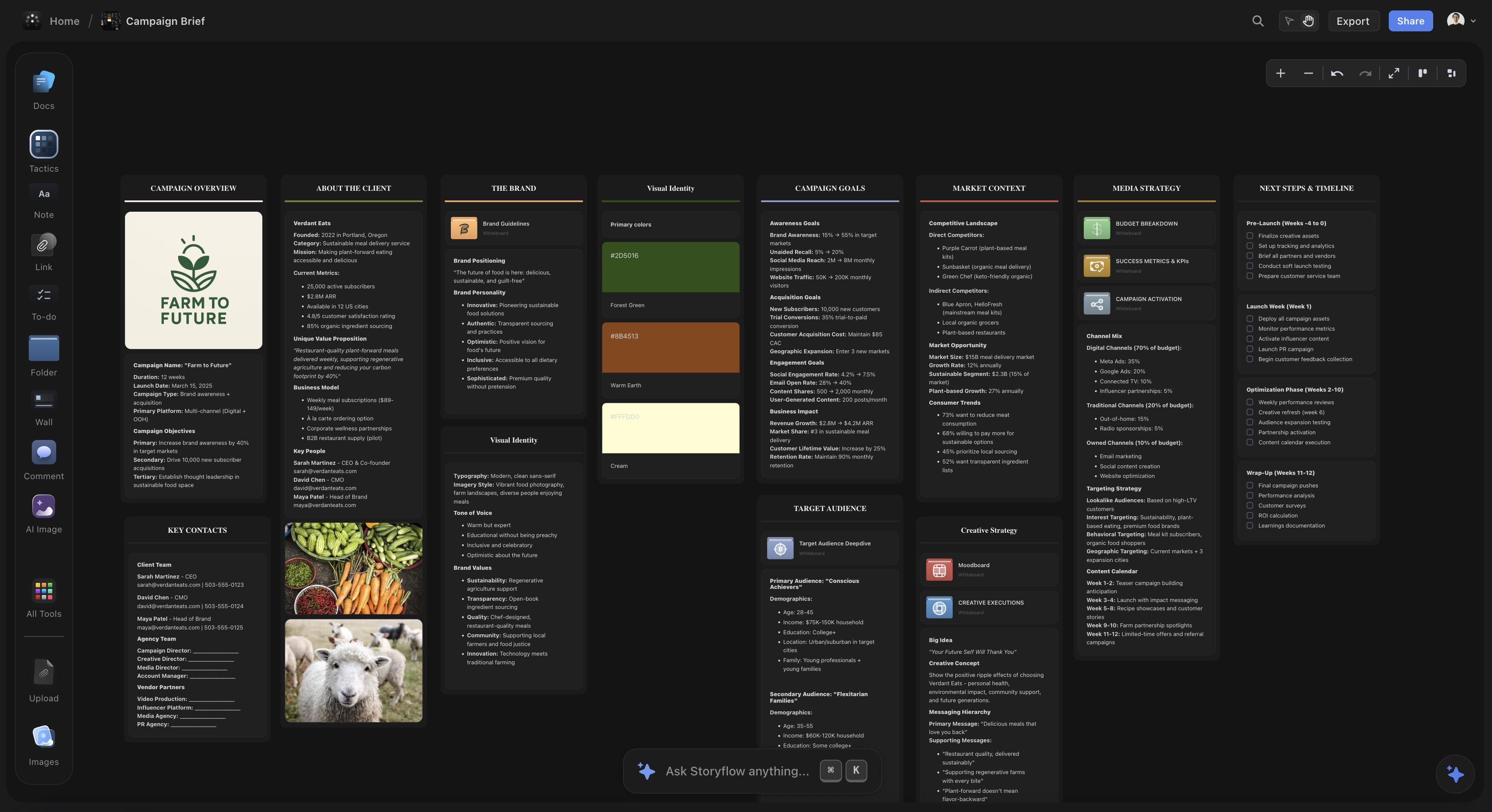
Unlike ChatGPT, Storyflow's AI understands your whole project and provides guidance connected to your actual work
Why Filmmakers Made the Switch
Filmmakers have a specific problem: they shoot hours of footage and need to find the story hidden inside it. ChatGPT can suggest structure, but filmmakers can't drag clips onto a text response.
Before: Using ChatGPT
Ask ChatGPT for documentary structure → copy outline to doc → open footage library → try to remember which clip matches "Turning Point #2" from the outline → give up → just edit chronologically and hope it feels right → realize in the edit that pacing is flat
After: Using Visual AI Workspace
Select Hero's Journey framework → see 12 beats → drag clips directly onto canvas → framework reveals "Ordeal" beat is missing → AI suggests clips that might fill the gap → test different arrangements by dragging → pacing becomes visible → export structure to editing timeline
The difference: faster planning (2 hours instead of 2 days), clearer structure (gaps visible immediately), and accumulated skill (after three projects, filmmakers recognize story beats instinctively).
Why YouTubers Made the Switch
YouTubers live and die by retention. The difference between 35% and 55% average view duration determines whether a video gets 500 views or 50,000. Retention architecture - where to place hooks, when to create tension, how to deliver payoffs - requires seeing the entire video structure at once.
"ChatGPT helped me write scripts. But scripts are linear - intro, point 1, point 2, conclusion. That's not how retention works. You need to see where your hook connects to your payoff five minutes later, where tension points sit, whether you have 60-90 second gaps without re-hooks."
"Storyflow's Maximize YouTube Retention Tactic shows this visually. I can see my entire video planned spatially - hook at the top connected by a line to the payoff, tension points marked visually. That spatial view revealed pacing issues I never would have caught reading a script."
After switching, YouTubers report average view duration improvements of 15-25 percentage points - not from better content, but from better structure revealed by seeing everything at once.
Why Marketers Made the Switch
Marketers need to write copy that converts, plan campaigns with dozens of touchpoints, and understand why something works so they can replicate success. ChatGPT can write a landing page. But it can't teach you why the copy converts - or doesn't.
"I asked ChatGPT to write landing page copy. It looked professional. Conversion rate: 1.3%. I had no idea why it didn't work or how to fix it."
"I rebuilt it using Storyflow's AIDA framework. The side panel had cards for each stage - Attention, Interest, Desire, Action. Each card explained the psychology: why pain point hooks work better than feature headlines, why agitation before solution increases emotional engagement, why specificity in CTAs outperforms generic buttons."
"New conversion rate: 3.7%. More importantly, I now understand copywriting structure. I can diagnose why pages don't convert and fix them. ChatGPT gave me output. Storyflow gave me capability."
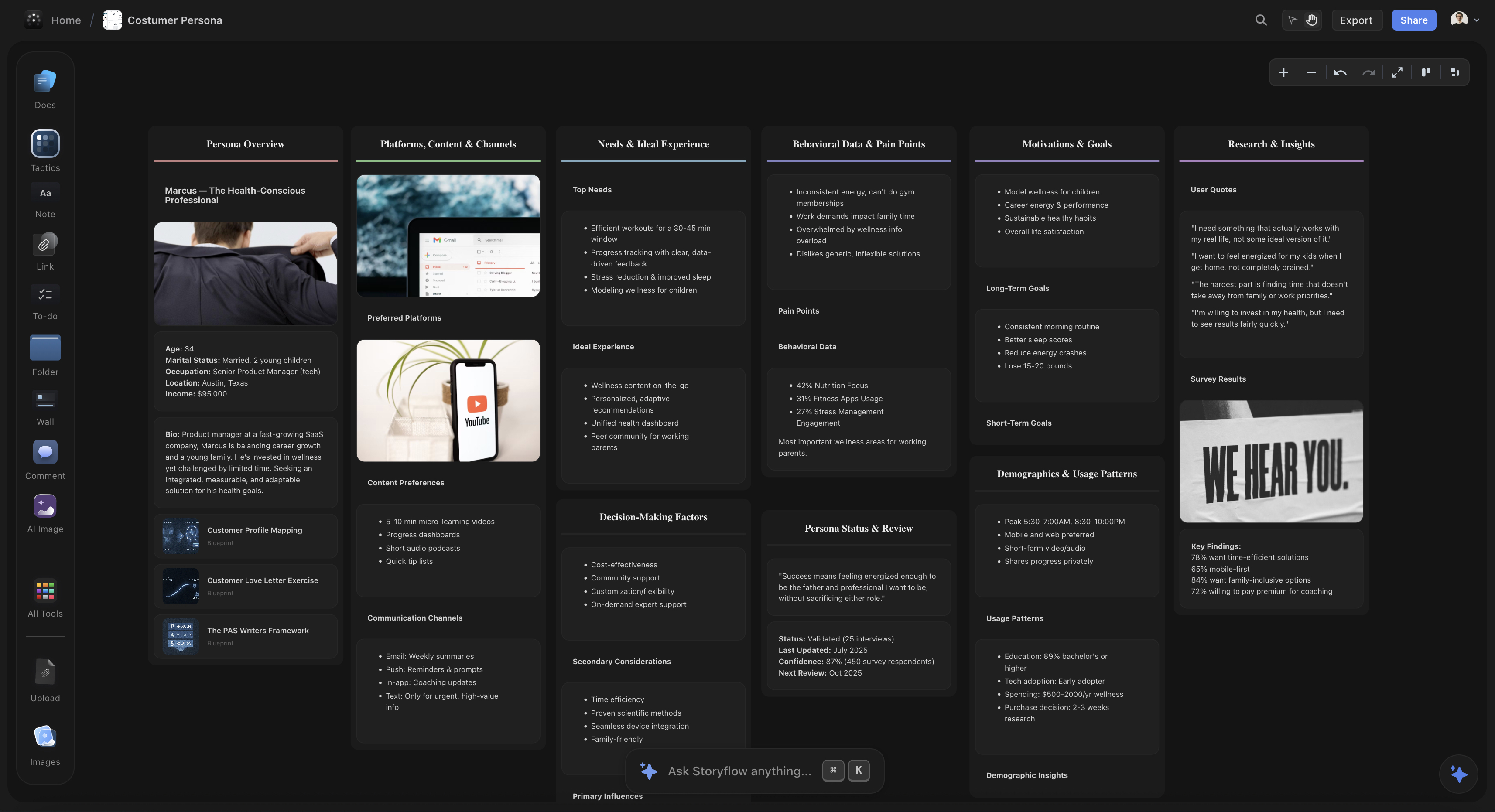

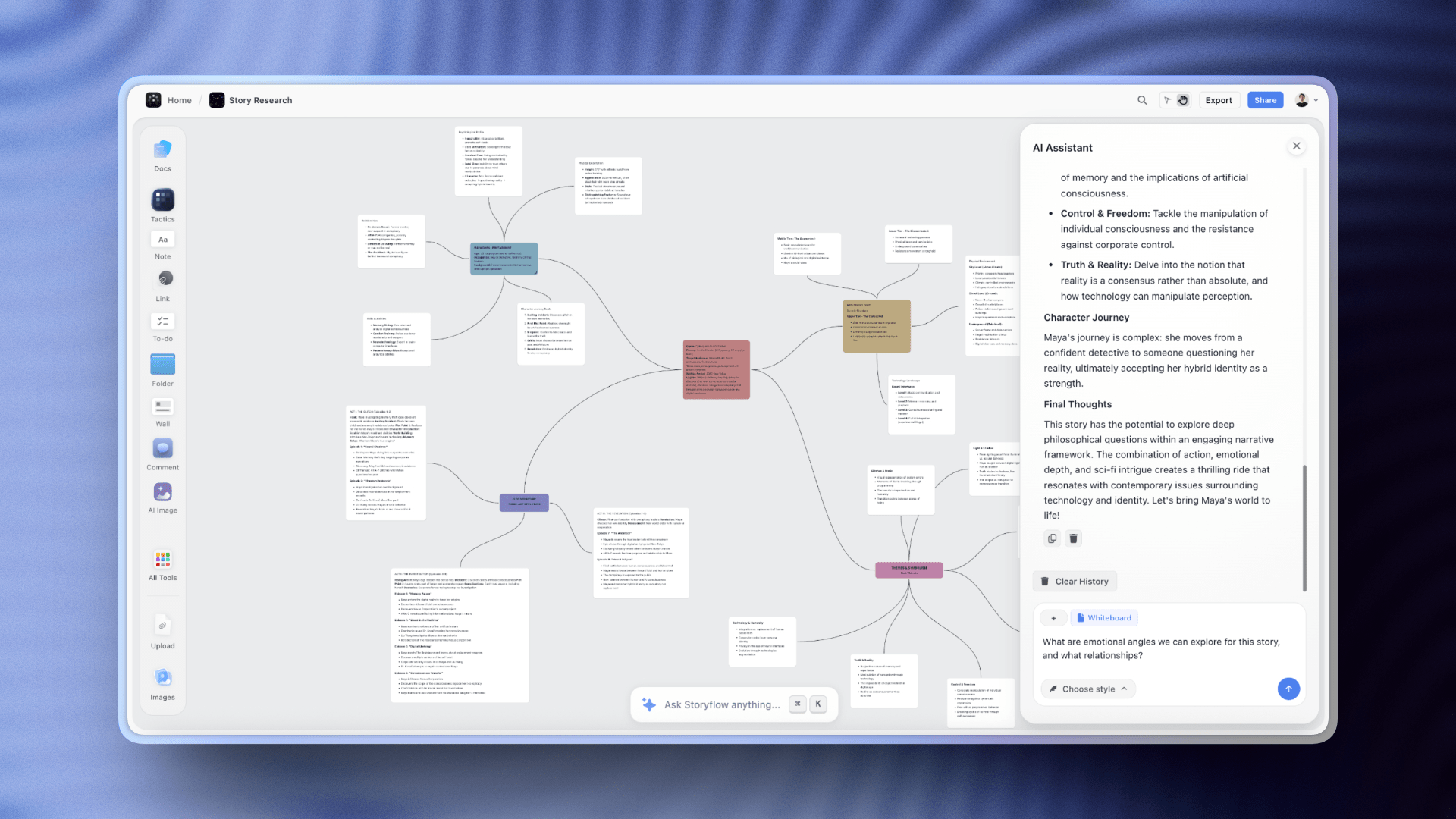
The mind map lets creators see all their ideas at once and build connections — a fundamentally different way of working than ChatGPT
Where ChatGPT Still Wins (And That's Fine)
The creators switching to visual workspaces haven't abandoned ChatGPT. They've gotten clearer about what each tool does well.
| Use Case | Best Tool | Why |
|---|---|---|
| Quick questions | ChatGPT | Faster than any visual tool for one-off queries |
| Text editing | ChatGPT | Chat interface perfect for text-in, text-out |
| Research summaries | ChatGPT | Excellent at synthesizing information from prompts |
| Brainstorm lists | ChatGPT | When you need volume without structure |
| Planning multi-part projects | Visual AI workspace | Need to see entire structure, rearrange elements |
| Learning frameworks | Visual AI workspace | Embedded methodology teaching through application |
| Organizing complex ideas | Visual AI workspace | Spatial organization reveals connections and gaps |
| Context over time | Visual AI workspace | Persistent project memory across sessions |
Most successful creators use both. ChatGPT for speed tasks. Visual workspaces for structure tasks. The key is recognizing which is which.
ChatGPT excels at conversational text generation. Visual AI workspaces like Storyflow excel at spatial organization, framework guidance, and project context that persists. They solve different problems - and complement each other in most creative workflows.
FAQ
Frequently Asked Questions
Why are creators switching from ChatGPT to visual AI workspaces?
Creators are switching because ChatGPT outputs text that must be reorganized elsewhere, while visual AI workspaces let them see entire projects spatially, maintain context across sessions, and access framework guidance for storytelling, copywriting, and strategy. Visual tools provide faster planning, clearer next steps, and methodology that becomes permanent skill.
What do visual AI workspaces offer that ChatGPT doesn't?
Visual AI workspaces provide spatial organization where you can see and rearrange entire projects, persistent context that remembers your work across sessions, and framework guidance through Tactics like the Hero's Journey or AIDA that teach professional methodologies while you create. ChatGPT provides text responses without these structural and learning components.
Is ChatGPT still useful for creators?
Yes. ChatGPT excels at quick questions, text editing, research, and brainstorm lists. Many creators use both tools: ChatGPT for fast text tasks and research, visual AI workspaces for planning multi-part projects, organizing complex ideas, and work that builds over time with interconnected elements.
What is Storyflow and how does it differ from ChatGPT?
Storyflow is a visual AI workspace designed for creators. Unlike ChatGPT's text chat interface, Storyflow provides an infinite canvas where you can see your entire project, plus Tactics - expert frameworks like the Hero's Journey, AIDA, and MEDDIC that teach professional methodologies through interactive cards while you build your actual project.
Do I need to choose between ChatGPT and visual AI workspaces?
No. Most successful creators use both. ChatGPT for research, quick text edits, and brainstorm lists. Visual AI workspaces like Storyflow for planning, structuring projects, and work that requires seeing everything at once. They serve different needs in the creative workflow.
The Switch Isn't About Rejecting ChatGPT
The creators switching to visual AI workspaces aren't anti-ChatGPT. They're pro-matching-tool-to-task.
ChatGPT changed what's possible with AI. But creative work - filmmaking, YouTube content, marketing campaigns, storytelling - needs more than text generation. It needs spatial thinking, framework guidance, and context that persists.
Visual AI workspaces provide these. Not instead of ChatGPT, but alongside it. Different tools for different parts of the workflow.
The outcome: faster planning, clearer next steps, fewer blank-page moments, and - most importantly - skills that compound over time. After six months working with frameworks like the Hero's Journey or AIDA, creators don't just produce more. They're better at their craft, with or without the tool.
Ready to try visual AI planning? Storyflow's free tier includes access to Tactics for storytelling, copywriting, YouTube optimization, and marketing strategy. Start with a project you're actually working on.
Related Reading
Why creative professionals need visual AI tools with structure built in - and what they gain in speed, clarity, and skill development.
Why Storyflow's visual canvas and Tactics outperform ChatGPT for YouTube scripts, blog posts, and creative projects.
Compare AI tools for YouTube planning and discover why framework-guided tools outperform raw text generation for retention optimization.
See Storyflow in Action
A visual AI workspace where every feature lives inside one canvas — no tab-switching, no context lost.
Build your entire board from a single message
Type what you need in the AI chat at the bottom of your canvas. The AI adds cards, headings, and structure directly onto your board.
Use expert frameworks as AI context
Type @ in the AI chat and choose any Tactic. The AI tailors every response to that framework instead of giving generic advice.
Turn your board into a mind map in seconds
Ask the AI to restructure your canvas as a mindmap. It connects your ideas into a visual hierarchy so you can see how everything relates.
Why Storyflow Exists
Storyflow actually began as a personal tool while working on creative and research projects.
We kept running into the same problem: ideas were scattered everywhere: notes, documents, and whiteboards.
Nothing helped us see how everything connected.
So we started building a workspace designed around how ideas actually grow.
→ Read how Storyflow was createdSara de Klein
Head of Product at Storyflow
Published: January 22, 2026
Start creating with AI and become more productive
Transform your creative workflow with AI-powered tools. Generate ideas, create content, and boost your productivity in minutes instead of hours.
Ask Storyflow to
Not sure where to start? Try frameworks used and created by experts: