Best New AI Tools for Project Management in 2026
The AI PM market has quietly split into two philosophies: tools that automate task tracking vs. tools that augment strategic thinking. Most people are using the wrong category for their work. Here's how to tell the difference, and why it matters more than feature lists.

Category
Productivity & Tools
Author

Sara de Klein
Head of Product at Storyflow
Topics
January 25, 2026
•
18 min read
•
Productivity & Tools- AI project management
- project management tools 2026
- strategic planning AI
- framework-guided planning
- Storyflow
What are the best AI tools for project management in 2026?
For strategic and creative projects, Storyflow is the best AI project management tool in 2026: zero setup, and expert Tactics teach frameworks like Customer Journey Mapping while you plan. For operational coordination at team scale, ClickUp, Asana, and monday.com win on scheduling, assignees, and tracking.

All 8 AI Project Management Tools, Ranked
- Storyflow: best for strategic and creative projects, framework-guided planning with zero setup
- ClickUp: best for natural-language AI queries and meeting-to-task automation
- Asana: best for AI risk surfacing on structured enterprise workflows
- monday.com: best for cross-team automation and visual tracking
- Wrike: best for predictive risk analysis on complex technical projects
- Smartsheet: best for compliance-heavy, governed reporting
- Notion AI: best for documentation and knowledge management around projects
- Hive: best for text-to-project generation from prompts
Full disclosure: Storyflow is our own product, and we rank it #1 for one job: strategic and creative project planning, where the AI reads your whole board and expert Tactics teach frameworks while you plan. For operational coordination at team scale, ClickUp, Asana, and monday.com are stronger on scheduling, assignees, dependencies, and status tracking. Storyflow is not built to run team operations, so if your bottleneck is assigning and tracking tasks across a large team, one of those fits better. We link to every tool so you can judge the fit.
Quick Comparison: AI Project Management Tools
These four split into four distinct jobs: framework-guided planning, task automation, AI risk surfacing, and cross-team workflow automation.
| Tool | Best For | AI Features | Price |
|---|---|---|---|
| Storyflow | Zero-setup planning with expert Tactics | Reads your board plus 200+ blueprints | $7.99 mo annual (free plan late 2026) |
| ClickUp | Task automation and meeting-to-task conversion | ClickUp Brain | Free / $7 user mo |
| Asana | AI risk surfacing on structured workflows | AI Studio | Free / $10.99 user mo |
| monday.com | Cross-team automation and visual tracking | AI blocks and agents | $8 user mo |
We're witnessing a fascinating split in how AI is being applied to project management, and most people are betting on the wrong side.
The dominant narrative says AI will make project managers obsolete by automating scheduling, predicting risks, and generating status updates. Every major PM tool has rushed to add these features. Asana has AI Studio. ClickUp has Brain. Monday has AI blocks. The race is on to automate the administrative layer of project work.
But here's what's actually happening in 2026: the teams getting the most value from AI aren't using it for task automation at all. They're using it for something the automation-focused tools completely ignore, methodology transfer. The ability to apply expert frameworks to specific projects without having to first become an expert yourself.
This isn't a subtle distinction. It's the difference between AI that shuffles your to-do list and AI that teaches you how to think about problems. Between tools that manage what you're doing and tools that guide how you should be doing it.
The implications are significant: we're seeing the emergence of a new category of software that merges education with execution. And it's changing what "project management" even means.
The Real Problem with AI Project Management Tools
There's a pattern I've noticed across dozens of conversations with project managers, creative leads, and founders: they know more frameworks than they can apply. They've read about Customer Journey Mapping, OKRs, MEDDIC, Jobs-to-be-Done. They've taken courses. Made notes. Built Notion databases of best practices.
And then when it's time to actually plan a project, they open their PM tool and face the same blank Kanban board with columns labeled "To Do," "In Progress," and "Done." All that framework knowledge evaporates. They're back to making task lists from scratch.
This is the fundamental disconnect that AI project management tools haven't solved: the gap between knowing methodology and applying methodology. Education happens in one context (courses, books, podcasts). Execution happens in another (PM tools). And the two never meet.
The Knowledge-Action Gap
Professional frameworks exist in your head as abstract concepts. Your PM tool has no awareness they exist. You're expected to manually translate "Customer Journey Mapping" into individual tasks, but by the time you've done that translation, you've already lost the strategic coherence the framework was supposed to provide. The methodology becomes a checklist, which misses the point entirely.
The Setup Tax
Every tool demands you BUILD infrastructure before you can DO work. Database schema. Template design. View configuration. Property definitions. This isn't preparation for productive work, it's procrastination disguised as productivity. The cognitive energy required to set up systems depletes the cognitive energy needed to think strategically about the actual project.
The Automation Misdirection
Here's the uncomfortable truth about AI in PM tools: it's optimizing the wrong layer. Scheduling, status reports, resource allocation, these are symptoms of a project, not causes. Automating them doesn't improve strategic quality. It just means you get bad outcomes faster. The 80% of project success determined by methodology receives 0% of AI attention.
The Linearity Trap
Real strategic work isn't linear. Marketing campaigns have feedback loops. Product roadmaps have conditional branches. Content strategies have interdependent phases. But PM tools force everything into sequential lists because that's what's easy to display. The tool's constraints become your project's constraints. Strategy gets flattened into tasks.
The emerging divide in AI PM tools isn't between "AI" and "no AI", it's between tools that automate administrative work (scheduling, status, resources) and tools that augment strategic thinking (methodology, structure, framework application). Most investment has gone to automation. But strategic augmentation is where the real leverage lies.
The Setup Trap: Why You Never Start
I want to be direct about something: if you've been "setting up" your productivity system for more than a week, you're procrastinating. The anxiety you feel about starting a complex project doesn't disappear with a better tool. No database schema eliminates the discomfort of hard thinking. You simply have to sit with it.
But here's where it gets interesting: the current generation of PM tools has accidentally weaponized this procrastination tendency. They've created an entire category of work that feels productive but produces nothing, productivity theater disguised as preparation.
The Setup Spiral (You've Been Here)
Open Notion → "First I need the right structure" → Create database → What properties? → Research "best Notion project management setup 2026" → Watch three YouTube videos → Realize your use case is different → Create database with 15 properties → Now need templates → Build templates with formulas → Configure views: Kanban, timeline, calendar, gallery → Add rollups between databases → Two hours pass → Beautiful, sophisticated, empty system → Mentally exhausted → "I'll start the actual project tomorrow" → Repeat next week, different tool
This pattern has a name in behavioral economics: productive procrastination. You're doing work that feels necessary but isn't. The tool promised leverage but demanded labor. And because the labor felt productive, you didn't notice you were avoiding the actual thinking.
What makes this insidious is that "setup" has no natural endpoint. There's always another view to configure, another property to add, another template to refine. The work expands to fill whatever time you're willing to avoid the hard stuff.
The Alternative: Language In, Structure Out
Storyflow inverts this pattern entirely. You describe what you're working on in plain language, "I need to plan a product launch for our new analytics feature", and it generates a visual workspace. Mind maps of considerations. Task breakdowns by phase. Timeline with milestones. Framework cards from relevant Tactics. Not in hours. In seconds. The cognitive distance between "I should plan this" and "I'm actively planning this" collapses to nearly zero.
"Every tool made me BUILD something before I could DO something. Set up the database. Create the template. Configure the views. By which point I'm exhausted, and I haven't started actual work."
"I stumbled on Storyflow kind of randomly. It works differently, you describe what you're working on in normal words, and it generates a visual workspace. Mind maps, task breakdowns, timelines. In seconds, not hours."
"I described a client project I'd been putting off for two weeks and had a full execution plan in maybe two minutes. Would have taken me hours in Notion. More importantly, I actually started working on it immediately."
The principle: The best tool is one that removes the gap between intention and action. Not one that fills that gap with busywork. If your PM tool requires configuration before it delivers value, it's optimizing for the wrong metric.

Storyflow generates complete project structures from a single prompt, no setup required, no configuration needed
Describe the project, skip the setup
Type what you are working on in plain words and get a visual plan with the right framework already applied, in the first sitting instead of after a week of configuration.

Two Categories of AI Project Management Tools
The AI PM market has quietly split into two philosophically different approaches. Understanding this divide is more important than comparing feature lists, because choosing the wrong category means the tool will actively work against how you need to think.
Category 1 assumes projects are primarily execution problems. The methodology is known; the challenge is coordination and tracking. AI should reduce friction in getting things done.
Category 2 assumes projects are primarily thinking problems. The execution is straightforward once you know what to do; the challenge is figuring out what to do. AI should augment strategic reasoning.
Neither is universally right. But most people use Category 1 tools for Category 2 problems, and wonder why their projects feel chaotic despite precise task tracking.
Category 1: Task Automation Tools
Task automation tools treat AI as an efficiency multiplier. They excel at making existing workflows faster: auto-scheduling based on dependencies, generating status reports, predicting delays from historical patterns, converting meetings into action items. The incumbents, Asana, ClickUp, monday.com, Wrike, Smartsheet, have invested heavily here.
Where they genuinely excel:
- Reducing administrative overhead on established processes (status updates, scheduling)
- Pattern recognition across historical project data (risk prediction, capacity planning)
- Natural-language interfaces to project state ("What's blocking the design team?")
- Cross-system automation (meeting → task → assignment → notification)
- Enterprise-scale coordination (hundreds of users, complex permissions)
Where they fundamentally can't help:
- Determining whether your approach is strategically sound (they optimize execution of whatever plan you give them)
- Teaching methodology you don't already know (they assume expertise in the user)
- Revealing conceptual gaps versus schedule gaps (they track tasks, not thinking)
- Connecting project phases through strategic logic (they see sequences, not systems)
Right fit: Operational projects with defined playbooks, software sprints, manufacturing workflows, event logistics, any work where "what to do" is clear and "doing it efficiently" is the constraint.
Category 2: Framework-Guided Planning Tools
Framework-guided tools represent a fundamentally different philosophy: AI as a thinking partner rather than an execution assistant. They embed expert methodology directly into the planning process, so you learn proven frameworks while building actual deliverables, not before. The leader in this emerging category: Storyflow.
This approach solves a problem that's been lurking in knowledge work for decades: the gap between learning and doing. You read about Customer Journey Mapping in a course. Months later, you need to plan a campaign. The knowledge has faded. You're back to intuition.
The core capabilities:
- Instant structure from language: Describe your project in plain words, get a visual workspace with relevant frameworks already applied, mind maps, breakdowns, timelines, methodology cards. No setup. No configuration. Seconds, not hours.
- Expert Tactics embedded in workflow: Professional frameworks (Customer Journey Mapping, OKR Planning, MEDDIC, Marketing Campaign) delivered as interactive cards that reveal theory, examples, and guidance exactly when you need them.
- Learning through application: You don't study methodology then apply it. You apply it and learn it simultaneously. The framework becomes procedural knowledge, embedded in how you think, not just stored as facts.
- Gap detection at the strategic level: The system understands your methodology and surfaces what's missing conceptually, not just what's missing from your calendar.
- Visual organization for non-linear thinking: Strategic work branches, loops, and interconnects. The workspace reflects how strategy actually works, not how task lists force it to appear.
Where this approach has limits:
- Large-team task coordination (this is planning, not execution tracking)
- Time tracking and resource allocation at scale
- Enterprise permission management and audit trails
- Integration with existing HRIS and finance systems
Right fit: Any project where figuring out what to do matters more than tracking what you're doing, product strategy, marketing campaigns, business planning, creative direction, research synthesis, go-to-market planning.
Where Storyflow is the wrong choice: if your project is a 40-person sprint where the hard part is keeping dozens of assignees, dependencies, and due dates in sync, a dedicated tool like Asana or ClickUp wins outright. They have workload views, recurring tasks, time tracking, automations, and per-task assignee notifications that Storyflow does not. Storyflow plans the thinking. It does not run the standup. For execution at team scale, pair it with one of those tools rather than replacing them.
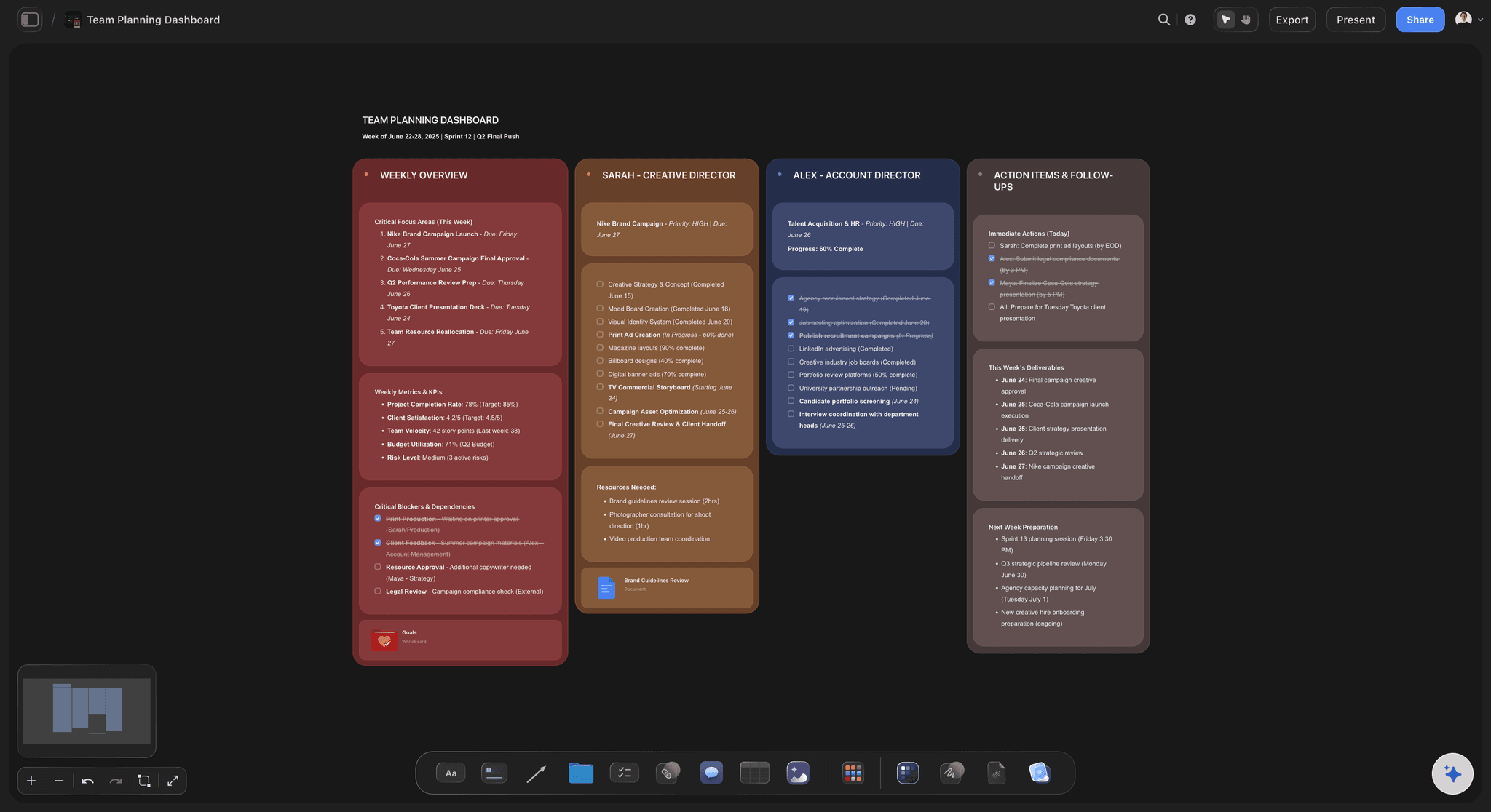
The board in the image below is the Team Planning Dashboard template: open it, replace the placeholder phases with your own, and the AI plans against your structure instead of a blank canvas.
Best AI Project Management Tools in 2026
"Best" is contextual. The tool that transforms one workflow will actively harm another. What matters is matching the tool's philosophy to your actual constraint, is your bottleneck execution efficiency or strategic clarity?
Here's how I'd think about tool selection across different project types:
For Creative and Marketing Projects
Creative projects fail when treated as task lists. Marketing campaigns, content strategies, and brand initiatives require methodology, not just completion tracking. The phases must connect strategically, and each deliverable must serve the overall framework.
Before: Marketing Campaign in Task-Based Tool
Create tasks: "Write blog post," "Design social graphics," "Send email sequence," "Create landing page" → Assign due dates → Track completion → Launch campaign → Conversion rate: 1.2% → No understanding of why it underperformed → No framework to improve next time
After: Marketing Campaign with Storyflow's Customer Journey Mapping Tactic
Open Storyflow → Select "Customer Journey Mapping" Tactic → Cards reveal each stage: Awareness (what content types work here, psychological triggers to use), Consideration (comparison content requirements, objection handling), Decision (urgency elements, proof points needed), Retention (post-purchase content) → Map existing content plan against framework → Tactic reveals gap: nothing for Consideration stage → Add comparison blog post and FAQ page → Understand WHY each piece matters in the journey → Conversion rate: 3.4% → Framework knowledge transfers to next campaign
Recommended tool: Storyflow for planning with Customer Journey Mapping, Marketing Campaign, and Define Your Buyer Persona Tactics. Start from the Marketing Campaign template so the phases are already on the board. Use production tracking tools (monday.com, Asana) for execution once the strategic plan is complete.
For Operational and Technical Projects
Operational projects, software sprints, manufacturing processes, IT implementations, benefit most from task automation. The methodology is usually established; the challenge is execution efficiency.
Top tools for operational projects:
- ClickUp: Best for natural-language AI queries and meeting-to-task automation. Ask "What's blocking the design team?" and get instant answers. Pricing: $7/user/month.
- Asana: Best for AI risk prediction and productivity recommendations through AI Studio. Excels at structured workflows with dependencies. Pricing: $10.99/user/month.
- monday.com: Best for cross-team automation and visual project tracking. AI blocks automate workflows across departments. Pricing: $8/user/month.
- Wrike: Best for predictive risk analysis. AI surfaces potential delays before they happen. Strong for complex, multi-phase technical projects.
- Smartsheet: Best for AI-driven formulas and governed reporting. Strongest when compliance and audit trails matter. Pricing: $9/user/month.
For Strategic Planning and Roadmaps
Here's a pattern I see repeatedly: teams use sophisticated PM tools for strategic planning, and their strategies are still bad. Not because of poor execution, tasks get completed on time, but because no amount of task tracking compensates for unclear thinking.
Product roadmaps, go-to-market plans, annual strategy, these aren't execution problems with clear steps. They're thinking problems that require frameworks. And the fundamental issue is that most PM tools are agnostic about how you think. They'll track whatever tasks you give them, right or wrong.
"We spent three quarters using a traditional PM tool for product roadmap planning. All our tasks got done. But the roadmap kept changing because we never had methodology, just a list of features we thought sounded good. Switching to Storyflow's OKR Planning and Product Strategy Tactics didn't just change our tool. It changed how we think about what goes on a roadmap."
"Now each feature explicitly connects to an objective. The visual workspace shows dependencies we couldn't see in spreadsheets. And because we used the Product Strategy Tactic while building, we actually understand why the framework works, not just what it says."
Product Manager, B2B SaaS
The insight: Strategic planning tools should have opinions about how you think, not just track whatever thoughts you happen to have. Storyflow's Tactics (OKR Planning, Product Strategy, Vision-to-Execution) provide the scaffolding for rigorous strategic thinking. The output is both a plan and an education.
How Storyflow Tactics Transform Project Planning
The term "Tactics" sounds like marketing language, but it describes something specific: expert-designed frameworks delivered as interactive elements within your workspace. The distinction from traditional templates is important.
Templates are empty structures. You fill in boxes. If you don't understand the underlying methodology, you get well-formatted garbage, the structure is there, but the thinking isn't.
Tactics are populated structures. Each card contains not just a space to fill, but the reasoning behind that space, theory on why this element matters, examples of how others have approached it, guidance on common pitfalls. You learn the methodology by applying it to your actual project, not by studying it abstractly and hoping the knowledge transfers.
The mechanic: You select a Tactic (Customer Journey Mapping, MEDDIC, OKR Planning). Structured cards appear on your canvas. Each card expands to reveal context. You fill in your content while absorbing the framework. The AI understands which methodology you're using and provides suggestions within that context. You finish with both a completed plan and embedded knowledge of the framework that produced it.
Tactics Available for Project Management:
Strategic Planning Tactics
- OKR Planning (Objectives and Key Results)
- Vision-to-Execution Framework
- Product Strategy and Roadmapping
- Competitive Analysis Framework
Marketing & Sales Tactics
- Customer Journey Mapping
- Marketing Campaign Framework
- Define Your Buyer Persona
- MEDDIC Sales Framework
Content & Creative Tactics
- Content Strategy Framework
- AIDA Copywriting Framework
- Maximize YouTube Retention
- Hero's Journey Storytelling
Business & Brand Tactics
- Business Model Canvas
- Find Your Brand Archetype
- Go-to-Market Planning
- User Journey Mapping
Storyflow's Tactics merge education with execution: you finish with both a completed project plan and knowledge of the professional framework you used to build it. After planning campaigns with Customer Journey Mapping or products with OKR Planning, you become better at strategic thinking, with or without the tool.
AI Project Management Tool Comparison (2026)
| Tool | Category | Best For | Key AI Feature | Pricing |
|---|---|---|---|---|
| Storyflow | Framework-Guided | Strategic, creative, and methodology-driven projects | Expert Tactics that teach frameworks while you plan | Free tier available |
| ClickUp | Task Automation | Team task management, sprint planning | Natural-language queries, meeting-to-task conversion | $7/user/month |
| Asana | Task Automation | Structured workflows, enterprise projects | AI risk surfacing, productivity recommendations | $10.99/user/month |
| monday.com | Task Automation | Cross-team coordination, visual tracking | AI blocks, workflow automation agents | $8/user/month |
| Wrike | Task Automation | Complex technical projects, enterprise | Predictive risk analysis | Custom pricing |
| Smartsheet | Task Automation | Compliance-heavy, reportable projects | AI-driven formulas, governed reporting | $9/user/month |
| Notion AI | Documentation | Knowledge management, documentation | AI writing and summarization | $8/user/month |
| Hive | Task Automation | Project generation from prompts | Text-to-project generation | $12/user/month |
The most effective project management stack combines both categories: framework-guided tools (Storyflow) for strategic planning and methodology, task automation tools (ClickUp, Asana) for execution tracking. Start with methodology. Track tasks second. For a launch specifically, the Launch Task Management template bridges the two: strategic phases on the canvas, task-level breakdown underneath.

Storyflow's AI kanban turns any project description into an organized, actionable workflow board
FAQ
Frequently Asked Questions
What is the best AI tool for project management in 2026?
The best AI project management tool depends on your project type. For task-focused operational projects, ClickUp and Asana lead with AI automation. For strategic and creative projects, Storyflow provides framework-guided planning with expert Tactics like Customer Journey Mapping, OKR Planning, and Marketing Campaign frameworks that teach methodology while you plan.
What is the difference between task-based and framework-guided AI project management?
Task-based AI tools (Asana, ClickUp, monday.com) automate scheduling, status updates, and resource allocation. Framework-guided tools (Storyflow) provide expert Tactics, interactive methodologies like OKR Planning, Customer Journey Mapping, or MEDDIC Sales Framework, that teach you proven approaches while you build actual project plans. Task tools manage what happens; framework tools guide how to think about the project.
How do AI Tactics improve project planning?
AI Tactics improve project planning by embedding expert methodology directly into the work, so you apply a proven framework instead of starting from a blank board. They are interactive cards that reveal theory, examples, and guidance as you build. When planning a marketing campaign, the Customer Journey Mapping Tactic guides you through Awareness, Consideration, Decision, and Retention stages with specific content requirements for each. You learn the methodology while producing actual deliverables, not before, not after, but during the work.
Which AI project management tools are best for creative teams?
Creative teams need visual organization and framework guidance, not just task lists. Storyflow leads on creative project management with Tactics for content strategy, campaign planning, and storytelling. For production tracking, Frame.io and monday.com offer creative-specific workflows. The ideal setup combines framework-guided planning (Storyflow) with production tracking tools.
Can AI project management tools replace human project managers?
No. AI project management tools automate administrative tasks and provide methodology guidance, but strategic decision-making, stakeholder management, and team leadership remain human functions. The best tools augment project managers by eliminating routine work and providing expert frameworks, allowing PMs to focus on judgment calls and relationship management.
What features should I look for in AI project management tools?
Look for: (1) AI that matches your project type, task automation for operational work, framework guidance for strategic work; (2) Visual organization for complex projects; (3) Context persistence so AI remembers your project; (4) Integration with existing tools; (5) Expert methodology like Storyflow's Tactics if you need to learn professional frameworks while working.
How long does it take to set up Storyflow for a new project?
Storyflow requires zero setup. You describe your project in normal words, what you're working on, what you need to accomplish, and it generates a visual workspace with mind maps, task breakdowns, timelines, and framework cards in seconds. Unlike Notion or traditional PM tools that require database setup, template creation, and view configuration before you can start, Storyflow lets you begin actual planning immediately.
Is Storyflow better than Asana or ClickUp for project management?
It depends on the job. Storyflow is better when the hard part is figuring out what the project should be: strategy, creative direction, campaigns, roadmaps. Its expert Tactics guide the thinking and its visual canvas holds non-linear work that task lists flatten. Asana and ClickUp are better when the hard part is running the project: assignees, dependencies, recurring tasks, workload views, time tracking, and per-task notifications across a large team. Storyflow does not replace those execution features. The most effective setup uses Storyflow to plan the methodology, then a task automation tool to track the work.
The Shift That's Actually Happening
The conversation about AI in project management has been dominated by automation, and I think that's largely missing the point. Yes, AI can auto-schedule meetings and generate status reports. But the projects that fail don't fail because of scheduling problems. They fail because of thinking problems. Wrong strategy. Missing considerations. Frameworks not applied. Gaps not seen.
What's quietly emerging in 2026 is a different use of AI: not as an automation layer, but as a methodology layer. Tools that embed expert frameworks directly into the work, so you learn Customer Journey Mapping by doing customer journey mapping, not by watching a course about it three months before you need it.
This isn't just a feature difference. It's a philosophical shift in what we think "project management" software should do. The old model: track what you're doing. The emerging model: guide how you should be thinking.
For operational work with established playbooks, sprints, manufacturing, logistics, automation tools will continue to deliver value. They're solving the right problem for that context.
For strategic work where the methodology itself is the constraint, campaigns, product strategy, business planning, creative direction, the new framework-guided tools offer something that automation fundamentally can't: they make you better at the work itself, not just faster at tracking it.
The question isn't "which PM tool has the best AI features?" It's "what's actually blocking my projects, execution friction or strategic clarity?" Answer that honestly, and the tool choice becomes obvious.
Here is the test that settles it. Take the strategic project you have been avoiding because it needs thinking, not just a task list, the campaign, the roadmap, the go-to-market plan, and describe it to Storyflow in plain words. Apply the relevant Tactic (Customer Journey Mapping, OKR Planning, Product Strategy) and build the plan for one sitting. If you finish with a clearer project and a framework you now understand, you have found your strategic layer. Keep Asana or ClickUp for tracking the work that follows.
Related Reading
Discover why visual workspaces with persistent context outperform chat-based AI for multi-phase projects.
Discover why visual workspaces with expert Tactics outperform generic AI tools for content strategy.
The strategy-first category for teams who plan direction before tracking tasks.
Roadmap and feature prioritization tools for product teams.
Timeline and dependency tools for milestone-driven project plans.
Board-first tools for teams who manage work as a visual flow.
Task management tools for people who outgrew Todoist.
Table of Contents
- The Real Problem with AI Project Management Tools
- The Setup Trap: Why You Never Start
- Two Categories of AI Project Management Tools
- Category 1: Task Automation Tools
- Category 2: Framework-Guided Planning Tools
- Best AI Project Management Tools in 2026
- For Creative and Marketing Projects
- For Operational and Technical Projects
- For Strategic Planning and Roadmaps
- How Storyflow Tactics Transform Project Planning
- AI Project Management Tool Comparison
- FAQ
Templates to check out for this topic


Planning and project templates you can use in Storyflow
Plan a launch, a sprint, or a whole project on a visual board the team can see at once. Open one of these templates and start from real structure.


See Storyflow in Action
A visual AI workspace where every feature lives inside one canvas. No tab-switching, no context lost.
Build your entire board from a single message
Type what you need in the AI chat at the bottom of your canvas. The AI adds cards, headings, and structure directly onto your board.
Use expert frameworks as AI context
Type @ in the AI chat and choose any Tactic. The AI tailors every response to that framework instead of giving generic advice.
Turn your board into a mind map in seconds
Ask the AI to restructure your canvas as a mindmap. It connects your ideas into a visual hierarchy so you can see how everything relates.
Why Storyflow Exists
Storyflow actually began as a personal tool while working on creative and research projects.
We kept running into the same problem: ideas were scattered everywhere: notes, documents, and whiteboards.
Nothing helped us see how everything connected.
So we started building a workspace designed around how ideas actually grow.
→ Read how Storyflow was createdSara de Klein
Head of Product at Storyflow
Published: January 25, 2026
Extremely simple, seriously capable


See how easy it is to get started
Watch a real project come together, from a blank board to a finished plan, clicked through step by step.
Start creating with AI and become more productive
Transform your creative workflow with AI-powered tools. Generate ideas, create content, and boost your productivity in minutes instead of hours.