
Storyflow
Home
Blog
Features
Login
Home
/
Blog
/
Article
The Best AI Tool for Video Production Planning (From Script to Screen)
Stop juggling spreadsheets, docs, and whiteboards. Discover how visual AI workspaces with framework guidance transform chaotic pre-production into structured workflows for documentary, narrative, and YouTube content.
Category
Video Production & Filmmaking
Author

Sara de Klein
Head of Product at Storyflow
Topics
January 22, 2026
•
20 min read
•
Video Production & FilmmakingStoryflow product facts (2026)
- Free: $0 with unlimited boards, 3 projects, 10 AI generations/month, and 3 Tactics.
- Pro: $14.99/month (annual) or $19.99/month (monthly) with 200+ Tactics and unlimited AI.
- Team: from $12.74/user/month (annual) with real-time collaboration and admin controls.
- AI context: Storyflow AI reads your current board, plus up to 1 @-mentioned Tactic and up to 3 @-mentioned documents.
Table of Contents
What is the best AI tool for video production planning?
Storyflow is the best AI tool for video production planning because it provides visual organization where you see your entire project spatially, framework guidance with proven storytelling structures like the Hero's Journey and YouTube Retention tactics, and context-aware AI that understands filmmaking terminology. It handles the complete pre-production workflow - from concept and story structure through shot lists and scheduling - in one workspace where everything connects visually instead of being scattered across spreadsheets, docs, and whiteboards.
Quick Recommendations
Storyflow:
Complete video planning: story structure, shot lists, visual organization, framework guidance
Frame.io:
Video review and collaboration (post-production focus)
Notion:
Text-based production management and databases
Shot list in Google Sheets. Story outline in a doc. Reference images in a folder somewhere. Interview transcripts you keep meaning to organize. Script notes scattered across three apps. Scheduling in another spreadsheet you haven't updated since Tuesday.
You open your laptop Monday morning to prep for Friday's shoot. It takes 20 minutes just to remember where everything is. You find the shot list but can't remember which shots connect to which story beats. You have 40 interview clips but no clear sense of how they'll flow together. The cinematography references are beautiful but disconnected from the actual scenes you're shooting.
This isn't disorganization. This is what happens when you try to plan something inherently spatial - a video with visual flow, narrative structure, and interconnected elements - using tools built for linear text.
Video production needs visual planning. Not another template. Not another AI that writes scripts. A workspace where you see story structure, shot coverage, and production logistics connected spatially - with AI that actually understands how films are made.
The Video Production Planning Problem
The tools filmmakers use haven't caught up to how filmmaking actually works. Here's what typically happens:
The Documentary Problem
You have 50 hours of interview footage. Each clip lives in your footage library with a filename. You need to find the narrative hidden inside - which clips tell the transformation story, where the turning points are, what order creates emotional impact. Spreadsheets can't show you this. You need to see clips arranged spatially against story structure.
The YouTube Problem
Your script is 12 minutes long. You need to architect retention - where hooks reconnect to payoffs, where tension points sit, whether you have 60-90 second gaps without re-engagement. Linear scripts hide pacing problems. You need spatial view of your entire video's retention architecture.
The Narrative Film Problem
You're shooting a short film with 15 scenes across 4 locations over 3 days. Each scene needs specific shots for coverage. Some shots establish location, some drive character development, some deliver plot information. Your shot list is a spreadsheet. You can't see which story beats lack visual coverage.
The Scattered Tools Problem
Story structure lives in one doc. Shot list in a spreadsheet. Schedule in Google Calendar. Reference images in a Dropbox folder. Script in Final Draft. Every time you make a story decision, you update four different places - or you don't, and things fall out of sync.
Video production planning fails when you try to organize inherently spatial work - visual sequences, narrative flow, interconnected shots - in linear, text-based tools. Filmmakers need to see the whole project at once.
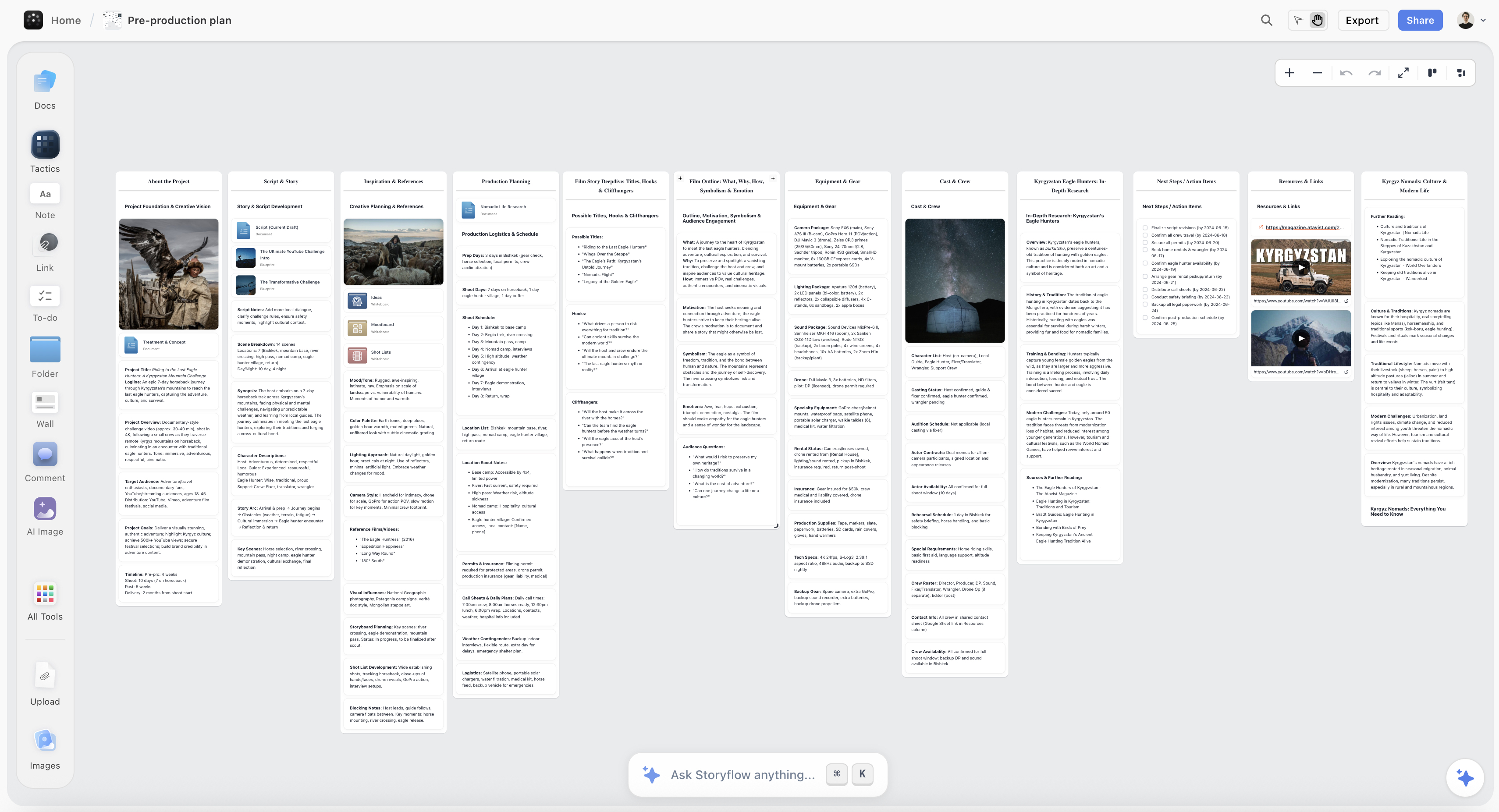
A complete pre-production plan in Storyflow with story structure, locations, and shot coverage all connected visually
What Video Planning Actually Needs
After working with documentary filmmakers, YouTube creators, and narrative directors, a pattern emerges. Successful video planning requires three elements that traditional tools don't provide:
1. Spatial Organization
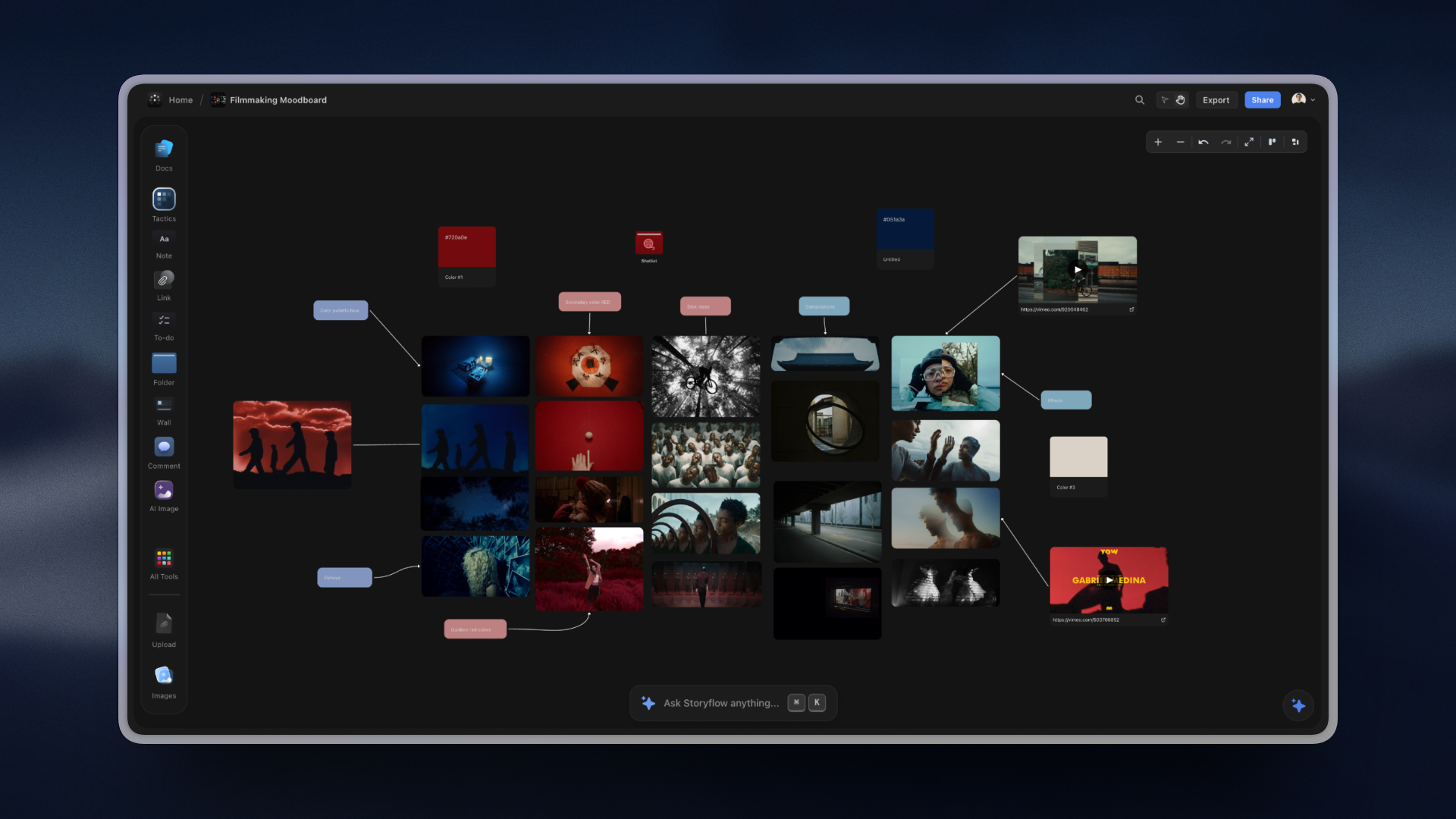
You need to see your entire video project arranged spatially. Not a list of shots in a spreadsheet. Not a script that reads linearly. A visual workspace where story beats, interview clips, B-roll needs, and cinematography references connect visually. Where you can drag a clip from "Opening" to "Climax" and immediately see how that affects pacing. Where gaps in coverage become obvious because you can literally see the empty space.
2. Framework Guidance
Professional filmmakers use proven structures. The Hero's Journey for transformation documentaries. Story Arc Structure for character-driven narratives. YouTube Retention tactics for platform content. But these frameworks exist as knowledge in books - not as tools you work with. You need frameworks embedded in your workspace, guiding while you build, teaching methodology through application.
3. Context-Aware Intelligence
Generic AI doesn't understand filmmaking. Ask ChatGPT about your "Ordeal" and it has no idea you're at the Hero's Journey crisis point. Ask for shot suggestions and it can't see what coverage you already have. Filmmakers need AI that reads the entire visual workspace, understands story structure, and speaks filmmaking language.
"I tried planning my documentary in Notion. Beautiful database. But I couldn't see my story. I had 40 interview clips tagged and organized, but tagging isn't storytelling. I needed to see which clips built the transformation arc, where the emotional beats landed, what order created impact."
"In Storyflow, I pulled in the Hero's Journey framework. Twelve beats appeared as anchors. I started dragging clips onto beats. 'Ordinary World' got three clips. 'Call to Adventure' needed one I'd overlooked. 'Ordeal' - the crisis moment - suddenly had obvious placement."
"Two hours later, I had a complete narrative structure. The visual arrangement revealed which clips were essential, which were redundant, where the pacing dragged. I couldn't have seen this in a spreadsheet."
Why Visual AI Workspaces Work for Video
Visual AI workspaces purpose-built for video production solve problems traditional tools can't address:
| Traditional Approach | Problem | Visual AI Solution |
|---|---|---|
| Shot list in spreadsheet | Can't see which shots cover which beats | Shots positioned on canvas against story structure |
| Story outline in doc | Linear reading hides pacing issues | Entire arc visible spatially, gaps obvious |
| Interview clips in folders | No sense of narrative flow | Clips arranged against framework beats |
| Reference images separate | Disconnected from actual shots | References positioned next to relevant scenes |
| ChatGPT for story help | No project context, generic advice | AI reads entire workspace, suggests specific improvements |
| Updates across 5 tools | Tools fall out of sync | Single workspace, everything connected |
The best video production planning happens when you can see your entire project spatially, access proven storytelling frameworks as you work, and get AI assistance that understands both your project context and filmmaking methodology.
For Documentary Filmmakers: Finding Story in Footage
Documentary filmmakers face a unique challenge: the story exists somewhere in dozens of hours of footage, but finding it requires seeing connections that aren't visible when clips live in folders with filenames.
Before: Traditional Documentary Planning
Import 50 hours of interviews → create spreadsheet with timecodes → tag clips by theme → read spreadsheet trying to imagine flow → guess at structure → start editing → realize halfway through that the structure doesn't work → start over
After: Visual Framework-Based Planning
Select "Film Transformation Journeys" Tactic → see transformation arc structure → drag interview clips onto canvas → arrange against framework beats → visual patterns reveal which clips show status quo, catalyzing event, struggle, breakthrough, new reality → pacing becomes visible → gaps obvious → export structure to editing timeline
The breakthrough: spatial arrangement reveals narrative structure that's invisible in lists.
"I was making a documentary about a small business owner who rebuilt after bankruptcy. I had 30 hours of interviews spanning two years. In my footage library, they were just files: INT_2023_03.mp4, INT_2024_08.mp4."
"I opened Storyflow and selected 'The Hero's Journey' framework. As I dragged clips onto the canvas and positioned them against the 12 beats, something clicked. Early interviews where he talked about 'business as usual' were Ordinary World. The bankruptcy filing was Call to Adventure. His refusal to accept government help was Refusal of the Call."
"But here's what shocked me: I had no footage for 'Meeting the Mentor.' The framework revealed a gap. I searched my interviews and found a 4-minute section where he talked about a business coach. I'd completely overlooked it. The framework didn't just organize my footage - it showed me what story I actually had and what I needed to find or shoot."
Documentary filmmakers using visual frameworks report 60-70% reduction in editing time - not from faster editing, but from entering post-production with clear structure instead of "we'll find it in the edit."
For YouTube Creators: Architecting Retention
YouTube success depends on retention. The difference between 40% and 65% average view duration can mean 10x the views. But retention isn't about individual hooks - it's about architecture. Where hooks connect to payoffs. Where tension builds and releases. Whether you have dangerous 90-second stretches without re-engagement.
Scripts are linear. Retention is spatial.
"I write good scripts. They read well. But my retention was stuck at 42%. I couldn't figure out why viewers dropped at the 3-minute mark every video."
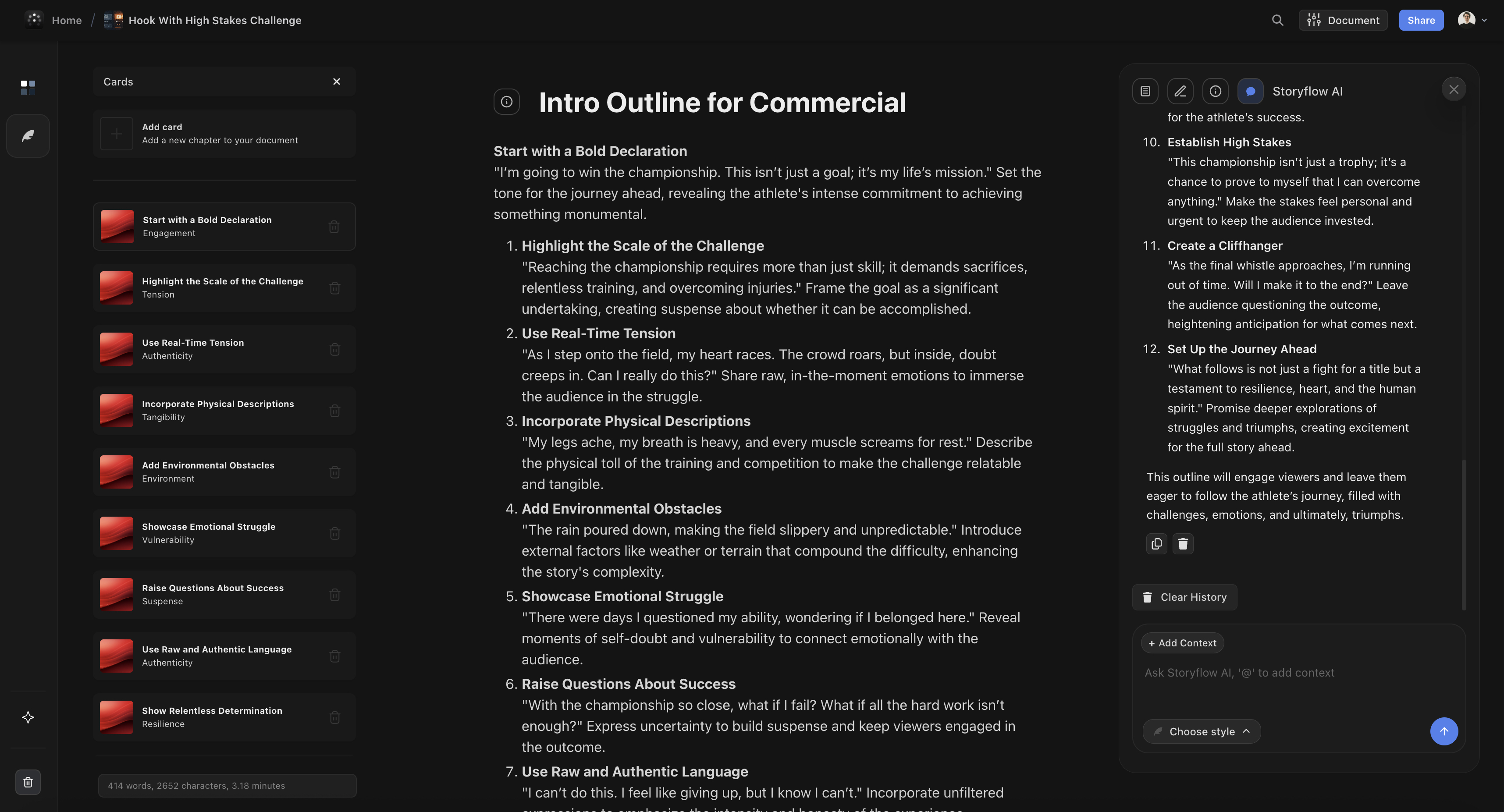
"I planned my next video in Storyflow using 'Maximize YouTube Retention.' The framework had me mark: opening hook, what it promises, where the payoff delivers, tension points throughout, re-hooks every 60-90 seconds."
"When I positioned everything spatially on the canvas, the problem became obvious. My opening hook promised 'the secret to growing fast.' But the actual reveal didn't come until minute 8. Viewers waited three minutes through context and examples, never getting closer to the promised secret. Of course they left."
"I restructured: opening hook → immediate mini-payoff (one tactical secret) → promise of deeper secrets → tension through examples → full methodology → final payoff. Same content, different architecture. Retention jumped to 63%. The spatial view revealed what linear script-writing hid."
YouTube creators report average retention improvements of 12-18 percentage points after switching to spatial retention planning - equivalent to 2-5x view increases for the same content quality.
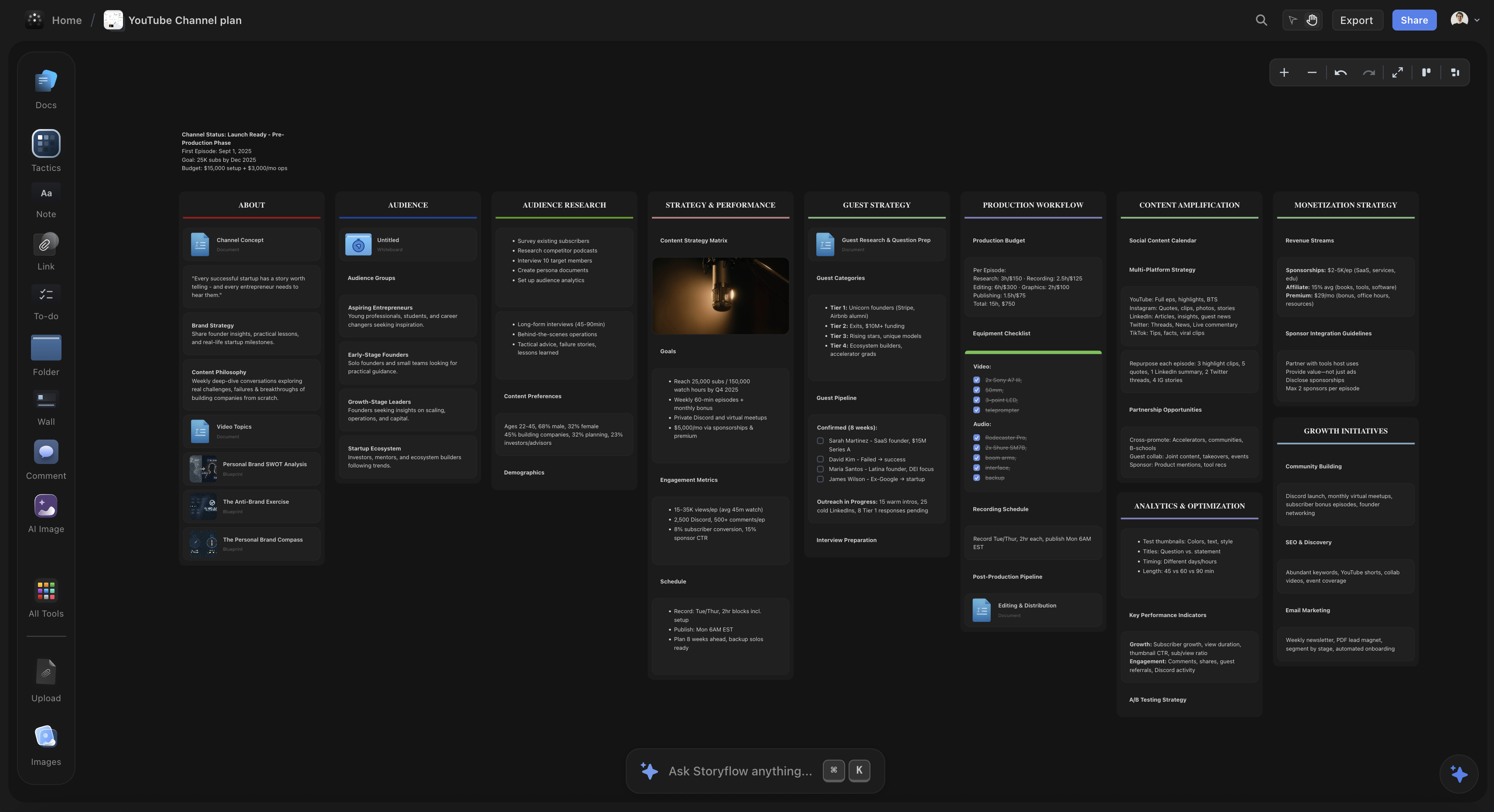
For YouTube content, spatial planning reveals retention architecture that's invisible in linear scripts. You need to see where hooks promise, where payoffs deliver, and whether dangerous gaps exist.
For Narrative Filmmakers: Coverage Meets Story
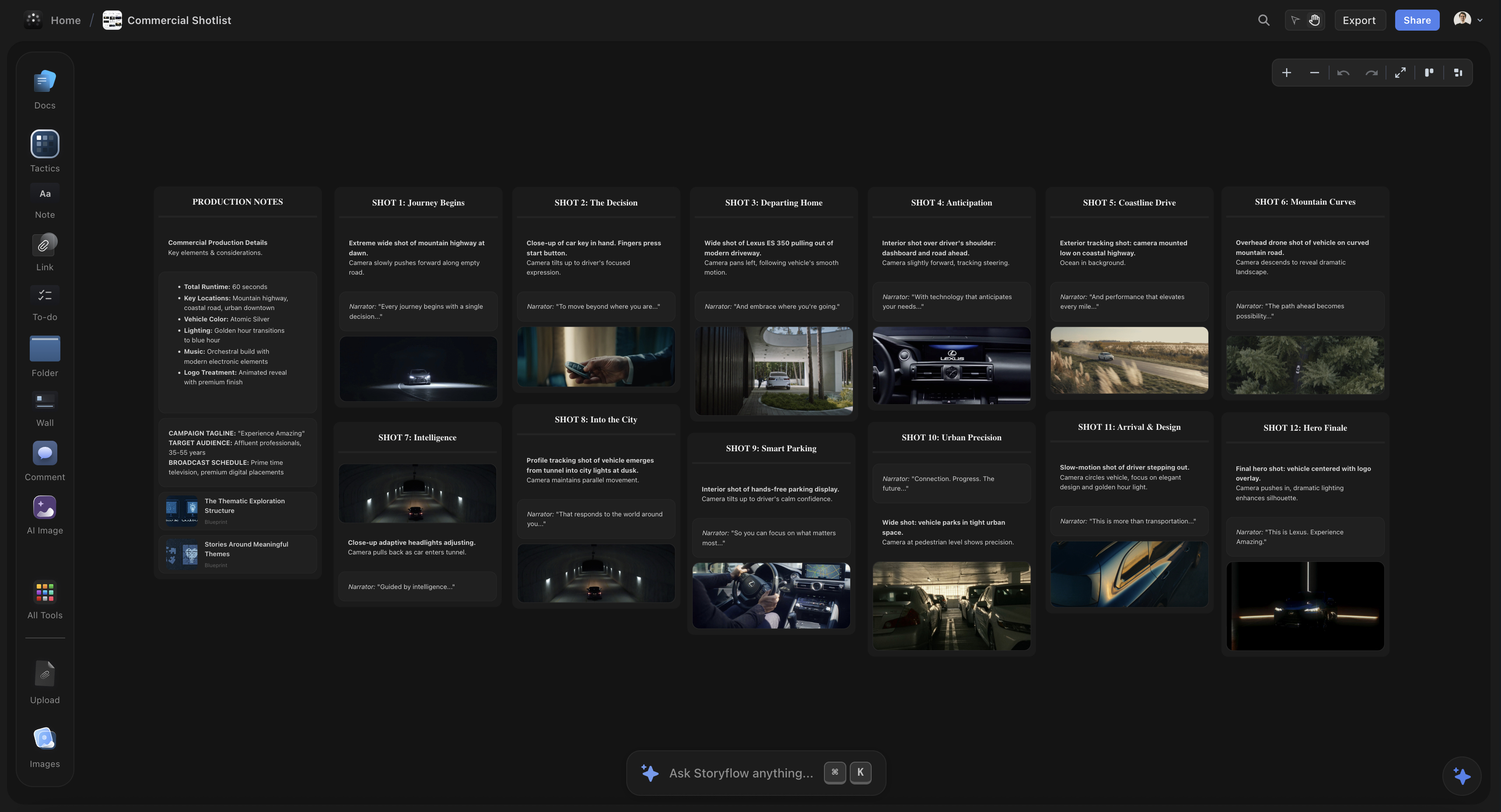
Narrative production requires precise planning: which shots establish location, which advance plot, which reveal character, which provide coverage for editing. Shot lists traditionally live in spreadsheets, disconnected from story beats.
The result: you shoot everything on the list and discover in editing that you have five ways to show the protagonist entering the apartment, but nothing that visually communicates their internal hesitation - the actual story beat.
A Real Planning Session
I'm planning a short film - 15 scenes, 4 locations, 3-day shoot. I pull in "Story Arc Structure" and map my scenes to exposition, rising action, climax, falling action, resolution.
Then I add my shot list. Each shot gets positioned next to its scene on the canvas. Wide establishing shot for scene 1. Medium two-shot for the conflict in scene 7. Close-up for the realization in scene 11.
The visual arrangement immediately reveals a problem: Scene 9 is the midpoint - the moment when protagonist's internal motivation shifts. But my shot list for that scene is all medium shots, dialogue coverage. Nothing that shows the internal shift. I add: extreme close-up on hands, long pause, looking away from other character. The framework revealed what the shot list alone couldn't show.
When shots live spatially against story structure, coverage gaps become obvious. You see not just whether you have shots, but whether you have the right shots for what the story needs at that moment.
The Complete Planning Workflow: Concept to Shoot-Ready
Here's how filmmakers use visual AI workspaces for complete pre-production:
Phase 1: Structure (Days 1-2)
- Drop initial concept/rough story onto canvas
- Select appropriate framework (Hero's Journey for transformation, YouTube Retention for platform content, Story Arc for narrative)
- Map rough ideas to framework beats - see what story you actually have
- Framework reveals gaps - missing beats, thin sections, unclear payoffs
- AI suggests which existing ideas fit which beats
Phase 2: Development (Days 3-5)
- For documentary: import interview clips or transcripts, position against structure
- For narrative: develop scenes, position against acts, see pacing spatially
- For YouTube: architect retention - mark hooks, tension points, payoffs
- Add reference images for cinematography inspiration
- Visual arrangement reveals what's working, what's not
Phase 3: Production Prep (Days 6-8)
- Build shot list positioned next to relevant story beats
- Add location notes, talent requirements, equipment lists
- Create shooting schedule organized by location and story sequence
- Everything remains connected to story structure - never lose sight of why you're shooting each shot
Phase 4: Shoot & Post (Production)
- Workspace accessible on phone/tablet during shoot
- Check coverage against plan, mark shots complete
- Structure exports to editing timeline or paper edit
- Enter post-production with clear story structure, not "we'll find it in the edit"
Filmmakers using this workflow report 50-70% reduction in pre-production time and significantly fewer "we don't have coverage for this" moments in editing.

Tool Comparison: Storyflow vs Alternatives
How does Storyflow compare to other tools filmmakers use?
| Tool | Best For | Limitations for Planning |
|---|---|---|
| Storyflow | Complete pre-production: story structure, shot lists, visual organization, framework guidance | Not for actual editing or post-production review |
| Frame.io | Video review, feedback, collaboration in post-production | Post-production focused, no story structure tools |
| Notion | Text documentation, databases, production management | Text-based, no visual spatial organization, no frameworks |
| Miro | Blank canvas collaboration | No filmmaking frameworks, no context-aware AI |
| ChatGPT | Script writing, brainstorming, quick questions | No project context, no spatial view, generic advice |
| Google Sheets | Shot lists, scheduling, budgets | Linear/tabular, can't see story structure spatially |
| Final Draft | Screenplay formatting | Linear screenplay view, no visual planning |
Most successful filmmakers don't choose one tool exclusively. They use Storyflow for pre-production planning and story structure, their NLE (Premiere, DaVinci, Final Cut) for editing, and Frame.io for review. Each tool serves different phases.
The breakthrough isn't replacing all tools with one tool. It's recognizing that pre-production planning - story structure, shot organization, coverage planning - requires spatial thinking and framework guidance that traditional tools don't provide.

Storyflow's shot listing keeps visual coverage organized alongside your narrative structure and production schedule
FAQ
Frequently Asked Questions
What is the best AI tool for video production planning?
Storyflow is the best AI tool for video production planning because it combines visual organization (see your entire project spatially), framework guidance (Hero's Journey, Story Arc Structure, YouTube Retention tactics), and context-aware AI that understands filmmaking terminology. Unlike generic tools, it's purpose-built for the complete pre-production workflow from concept to shoot-ready structure.
How do professional filmmakers plan video productions?
Professional filmmakers use story frameworks (Hero's Journey, Story Arc Structure) to structure narrative, create shot lists that map to story beats, organize footage libraries by scene or sequence, and maintain continuity through visual references. Modern filmmakers increasingly use visual AI workspaces to see entire projects spatially while accessing proven storytelling frameworks.
What should video production planning include?
Complete video production planning includes: story structure (narrative arc or retention architecture), shot list organized by scene, location and talent scheduling, equipment lists, reference images for cinematography, budget tracking, and continuity notes. Visual planning tools let you see all elements connected spatially rather than buried in separate documents.
Can AI help with documentary filmmaking?
Yes. AI assists documentary filmmaking by suggesting narrative structures for interview footage, identifying thematic connections between clips, recommending which story frameworks fit your material (Hero's Journey for transformation stories, Document Your Journey to a Challenging Place for expedition docs), and helping organize dozens of hours of footage into coherent story arcs.
Do I need specialized software for video production planning?
Not necessarily. Many filmmakers still use spreadsheets and docs successfully. But visual AI workspaces designed for video production save significant time by combining story structure, shot planning, and organization in one place - with AI that understands filmmaking terminology and can suggest improvements to pacing, structure, and coverage.
From Scattered Tools to Structured Vision
The difference between amateur and professional video production isn't camera quality or editing skill. It's structure. Professionals enter production with clear story architecture, comprehensive shot coverage, and visual planning that accounts for narrative flow.
Traditional tools - spreadsheets, docs, generic whiteboards - force filmmakers to plan spatially visual work in linear, text-based formats. Visual AI workspaces purpose-built for video production match tool to task: spatial organization for spatial work, framework guidance from proven storytelling structures, and AI that actually understands filmmaking.
Documentary filmmakers find narrative structure hidden in dozens of hours of footage. YouTube creators architect retention that converts views to watch time. Narrative filmmakers ensure shot coverage serves story beats, not just production logistics.
The outcome: 50-70% reduction in pre-production time, fewer coverage gaps in editing, and - most importantly - videos with clear structure because structure was built in from the beginning, not discovered (or not) in post.
Ready to plan your next video production with structure built in? Storyflow's free tier includes Tactics for the Hero's Journey, Story Arc Structure, Film Transformation Journeys, YouTube Retention, and Hook Viewers Using Psychology. Start with your next video project.
Related Reading
Compare AI tools for YouTube planning and discover why framework-guided tools outperform raw text generation for retention optimization.
Learn professional script structure frameworks for video, film, and content creation with practical planning techniques.
ChatGPT generates text. Creators need structure. Discover why filmmakers, YouTubers, and marketers are switching to visual AI workspaces.
See Storyflow in Action
A visual AI workspace where every feature lives inside one canvas — no tab-switching, no context lost.
Build your entire board from a single message
Type what you need in the AI chat at the bottom of your canvas. The AI adds cards, headings, and structure directly onto your board.
Use expert frameworks as AI context
Type @ in the AI chat and choose any Tactic. The AI tailors every response to that framework instead of giving generic advice.
Turn your board into a mind map in seconds
Ask the AI to restructure your canvas as a mindmap. It connects your ideas into a visual hierarchy so you can see how everything relates.
Why Storyflow Exists
Storyflow actually began as a personal tool while working on creative and research projects.
We kept running into the same problem: ideas were scattered everywhere: notes, documents, and whiteboards.
Nothing helped us see how everything connected.
So we started building a workspace designed around how ideas actually grow.
→ Read how Storyflow was createdSara de Klein
Head of Product at Storyflow
Published: January 22, 2026
Start creating with AI and become more productive
Transform your creative workflow with AI-powered tools. Generate ideas, create content, and boost your productivity in minutes instead of hours.
Ask Storyflow to
Not sure where to start? Try frameworks used and created by experts: